




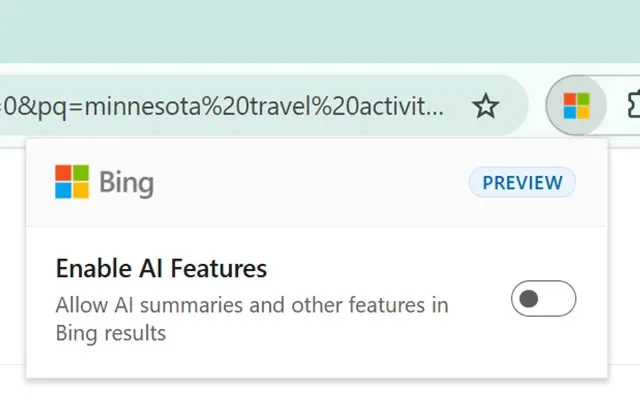
Microsoft is highlighting two ways to hide AI-generated answers in Bing: a Chrome and Edge extension with a persistent toggle, and a -ai query operator for individual searches. The extension remains in preview and also changes the browser’s default search engine to Bing, while the query operator works without an installation or settings change.
Key takeaways
- The Microsoft Bing AI Search Choice extension adds a toggle for AI features across Bing searches in Chrome and Edge.
- Installing it sets Bing as the browser’s default search engine.
- Adding
-aito a query suppresses AI answers for that search without an extension. - Microsoft’s November 11, 2026, blog post documents options that had first appeared in June.
For PC users, the choice is between a persistent browser-level control—with a default-search change attached—or a manual suffix on each query.
How the two options work
The extension lets users switch Bing’s AI features on or off through a browser toolbar control. Microsoft describes the off setting as a way to focus on standard search results and links. The extension is available for Chrome and Edge, but the company has not announced support for Firefox or other browsers.
The alternative is to add -ai to a Bing search, such as why is the sky blue -ai. That request applies to one search at a time, so users must add the operator again for later queries. Microsoft says it suppresses AI-generated answers; its announcement does not detail how the operator affects other page features.
The extension changes the default search engine
The most significant caveat for Chrome users is that installing the extension also makes Bing the browser’s default search provider. The AI control is limited to Bing, so users who want to keep Google or another search engine as their default may prefer the per-query operator—or avoid installing the extension.
Microsoft has not explained why the AI toggle is delivered through an extension rather than a setting on Bing’s website. Search Engine Roundtable also noted that Bing previously offered a settings control for Copilot responses, but that control is no longer available. The current alternatives therefore require either an extension or a search-query change.
A choice, but with unanswered details
Microsoft says its research indicates that users want to choose whether AI is involved in each search session, but it has not published details about that research. The extension is still labeled a preview, and Microsoft says the experience may change. Its November blog post formalizes the options, which had been announced earlier in 2026.
The announcement does not explain whether turning off AI changes advertising placement, which Copilot features are affected, or how widely the controls are available across markets and devices. For now, users seeking conventional results can use the toggle in supported desktop browsers or apply -ai to specific Bing queries.
Via Bing