
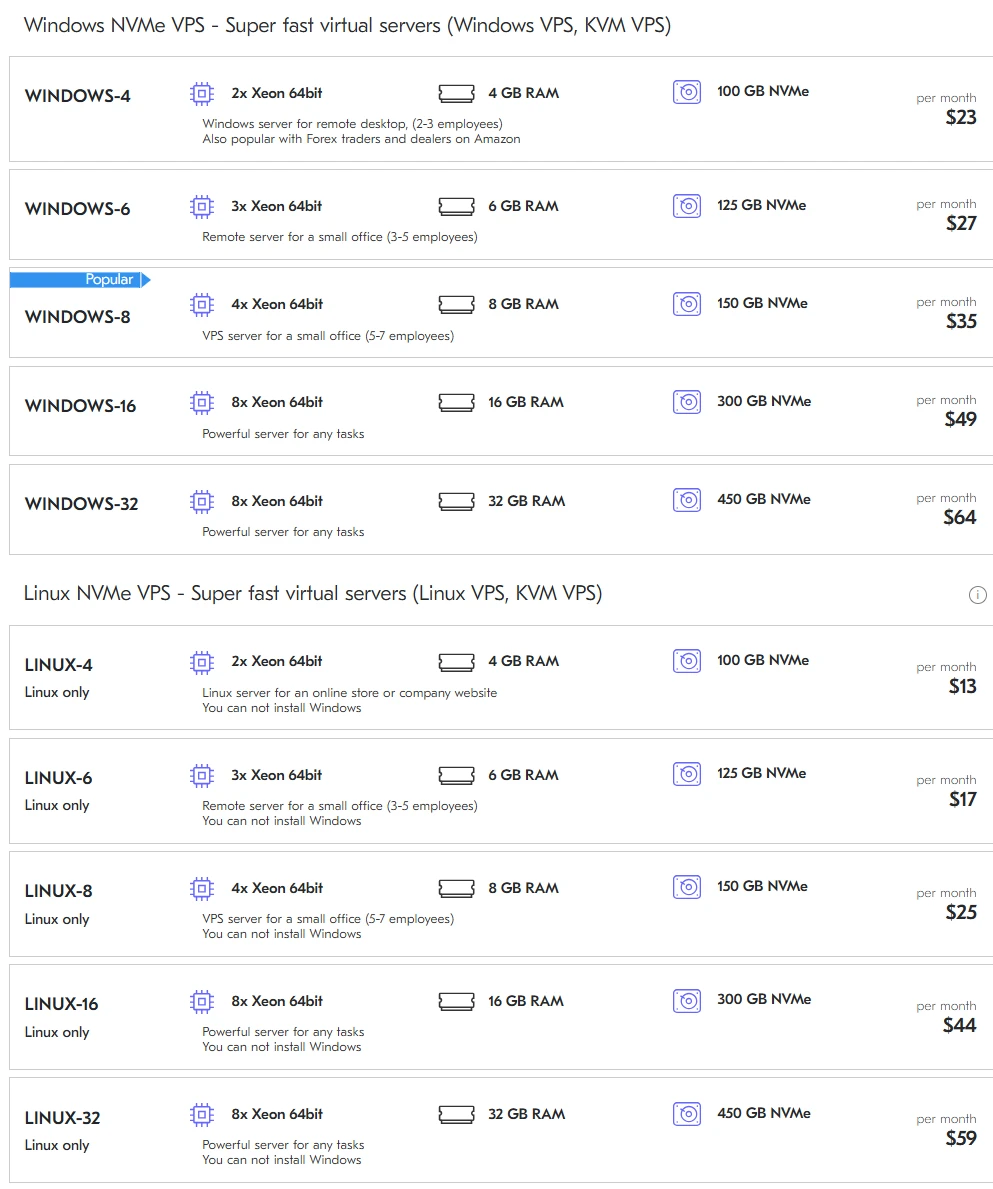
Choosing a server in today’s market is a bit like dating: everyone puts their best photo forward, but you don’t really know what you’re getting until you try to run a heavy database at 3 AM. The screenshot provided gives us a rare, honest look at a price list that doesn’t hide behind “unlimited” marketing fluff. We are looking at a battle between Windows and Linux NVMe VPS plans, segmented by RAM capacity. But here is the kicker: in the US market, where every millisecond of latency costs a dollar and every gigabyte of RAM is priced like a rare isotope, making the right choice isn’t just a technical task—it’s a financial survival skill.
The Great OS Tax: Why Windows Costs You a Steak Dinner
If you look closely at the pricing tiers, there is a glaring discrepancy that jumps off the screen. For the exact same hardware—let’s take the 4GB RAM entry-level model—the Linux version costs $13, while the Windows version demands $23.
Why the $10 gap? That is the “Microsoft Tax.” Running Windows on a VPS in the USA is like insisting on wearing a tuxedo to a construction site; it’s polished, familiar, and has a great UI, but you’re paying for the brand and the licensing fees. In a US-based data center, where energy costs and rack space are premium, that extra $10 a month for a license can add up to $120 a year. If you’re a small startup in Austin or a developer in San Francisco, that’s money that could have gone into your coffee budget—or better yet, more RAM.
The Entry Level (4GB – 6GB): The “Digital Office” Tiers
The Windows-4 and Windows-6 plans (and their Linux counterparts) are clearly marketed as remote desktops for small teams. Think of these as your “pioneer” servers.
-
Best for: Remote desktops (RDP), Forex trading, and basic Amazon seller accounts.
-
The US Context: In the United States, Forex traders need low latency to the New York or Chicago exchanges. A 4GB VPS is the bare minimum. If you try to run a full Windows GUI on 4GB while executing high-frequency trades, you are essentially asking a toddler to carry a sofa. It might work for a minute, but a crash is coming.
-
Analogy: It’s like a studio apartment in Manhattan. It’s cramped, you can’t have many guests (employees), but it gets you in the door of the most important neighborhood in the world.
The “Sweet Spot” and the Brutal Reality of RAM Prices
Now, let’s talk about the elephant in the server room: the price of memory. Look at the jump from Windows-8 ($35) to Windows-16 ($49).
The industry is currently in a bizarre state. While NVMe storage (those lightning-fast drives) has become relatively affordable, high-speed ECC RAM is still the “liquid gold” of the data center. In the US, hardware supply chains are recovering, but the demand for AI and large language models has sucked up the global supply of high-density memory chips.
When you buy the Windows-16 plan, you aren’t just buying chips; you’re buying stability. In the US market, a server with 16GB of RAM is the professional standard. It’s where you stop playing around and start hosting serious web stores or small corporate databases.
The Emotional Gut Punch: The 8GB “Popular” Trap
The image labels Windows-8 as “Popular.” Honestly? That’s heartbreaking. It’s popular because people are afraid to spend $49, so they settle for $35. But 8GB of RAM on a Windows Server is like a “large” coffee that’s actually 50% foam. You feel like you’re getting a lot, but as soon as you open Chrome and a couple of management tools, that 150GB NVMe drive starts “swapping” because the RAM is full, and your “super-fast” server begins to crawl like a turtle in peanut butter. It’s frustrating, it’s a bottleneck, and in the high-stakes US business environment, a slow server is a dead server.
Comparing the Heavyweights: 16GB vs 32GB
When we move into the Windows-32 and Linux-32 territory ($64 and $59 respectively), we are entering the realm of “The Heavy Lifters.”
-
CPU Power: Notice that both the 16GB and 32GB plans use 8x Xeon 64bit cores. The processing power is the same, but the memory doubles.
-
The Use Case: These are your “Production Engines.” If you are running a high-traffic e-commerce site on Magento or a complex WordPress multisite for a US-wide audience, 32GB is your safety net.
-
The Linux Advantage: Look at Linux-32 at $59. For sixty bucks, you get a beast that can handle thousands of concurrent users. In the US, where “time to first byte” (TTFB) determines your Google ranking, having this much headroom is like having a V8 engine on an open Texas highway. You aren’t just driving; you’re dominating.
USA Geography: Does Location Actually Matter?
Hosting these plans in the US offers a unique advantage: the backbone. Whether your server is in Ashburn (Virginia), Dallas, or Silicon Valley, the peering is world-class.
-
East Coast (Virginia/NY): Perfect for those Windows-4 Forex plans. You are inches away from the financial heart of the world.
-
Central (Texas/Chicago): The Linux-16 sweet spot for nationwide apps. Low latency to both coasts.
-
West Coast (California): The 32GB powerhouse zone for tech startups.
The NVMe storage mentioned in every plan is the “secret sauce.” In the US, where users expect websites to load before they even finish clicking, mechanical hard drives are prehistoric. NVMe is no longer a luxury; it’s a requirement for survival.
The Verdict: Which One Should You Click?
Choosing between these plans shouldn’t be a guessing game. It’s about matching your ambition to your budget without strangling your performance.
The Final Verdict: Why Deltahost is the Smart Move for the US Market
Choosing a VPS isn’t just about staring at a table of numbers; it’s about choosing a partner that won’t leave you hanging when your traffic spikes or your database starts sweating. After breaking down these tiers, it is clear that Deltahost has engineered these plans specifically to bridge the gap between “affordable” and “enterprise-grade.” In a landscape like the United States—where you are competing with tech giants—having a Deltahost NVMe-backed server gives you the tactical edge of high-speed storage without the astronomical “big brand” price tag.
If you are looking for the absolute best ROI (Return on Investment), my professional advice is to lean into the Deltahost Linux-16 or Linux-32 plans. These are the “hidden gems” of their lineup. They offer enough RAM to handle the modern web’s memory-hungry demands while keeping your overhead low. For those who absolutely require a Windows environment for RDP or specialized software, the Windows-8 “Popular” plan serves as the perfect entry point, provided you keep your workflow lean and mean.
Why Deltahost?
-
The NVMe Advantage: While other providers still try to sell you old SSDs or (heaven forbid) HDD storage, Deltahost includes super-fast NVMe across the board. In the US, where speed equals SEO rankings, this is non-negotiable.
-
Transparency: What you see is what you get. No hidden fees for “basic” support or sudden price hikes after the first month—a common trap in the American hosting market.
-
Scalability: You can start small on a Linux-4 and move up the ladder as your business grows, ensuring you never pay for resources you aren’t actually using.
Don’t let your project sit in the slow lane. The digital world moves fast, and the American market moves even faster. By choosing a Deltahost plan, you’re investing in stability, speed, and the peace of mind that your infrastructure can handle whatever the internet throws at it. Take a look at your current requirements, pick the Deltahost tier that fits your “peak” needs, and give your business the engine it deserves.