SQLite encryption is often treated as an afterthought until a plaintext database file surfaces in a security audit or breach investigation. With SQLite deployed across an estimated one trillion active databases, from mobile apps to embedded IoT sensors, the absence of native encryption means countless database files are exposed to anyone with file system access.
This guide walks you through encrypting your SQLite database using the Devart ODBC Driver for SQLite. Whether you’re protecting PII in an analytics cache, securing app credentials, or meeting GDPR, these steps will get you production-ready.
Why SQLite database encryption matters
SQLite’s biggest advantage is also where problems can start. The entire database lives in a single .db file — schema, data, indexes, everything. Anyone who gets access to that file can open it. No password required.
In real systems, that’s not just a theoretical risk. A compromised laptop, a misconfigured backup, or even a copied database file can expose the whole dataset in plain text.
This becomes especially relevant in the places where SQLite is used the most. Mobile apps often store health data, financial transactions, or cached user information locally. IoT devices collect telemetry before sending it to the cloud. Analytics tools sometimes rely on SQLite for lightweight reporting. In all of these cases, if the database isn’t encrypted, anyone with file access can read the data directly.
Compliance makes the issue harder to ignore. Regulations like GDPR require organizations to protect personal data with appropriate technical safeguards. Article 32 specifically mentions measures such as encryption. If a local SQLite database contains personal data, medical information, or payment details, leaving it unencrypted can quickly become a compliance problem.
For teams already working with ODBC, the solution is often simpler than expected. Many analytics and reporting platforms connect to SQLite through ODBC anyway. That means encryption can be introduced at the driver level, without changing application code or redesigning the system around it.
Common methods of encrypting SQLite databases
SQLite doesn’t include built-in encryption, so it has to be added using external tools or extensions. The table below summarizes the approaches before we look at each method in more detail.
| Method | License | Setup complexity | Key management | Integration |
| Devart ODBC Driver | Commercial | Low | Connection String / PRAGMA | ODBC-native |
| SEE | Commercial | High | PRAGMA key | Manual build |
| SQLCipher | Open Source | Medium | PRAGMA key | Needs recompilation |
Devart ODBC encryption approach
The Devart ODBC Driver for SQLite takes a fundamentally different path from other encryption options. Rather than modifying SQLite itself, it adds encryption support at the driver level — meaning developers can enable encryption through connection string parameters alone. No recompilation, no patched SQLite binaries, no changes to application-level database logic.
Encryption is configured through connection string parameters when establishing a connection to the database. The driver uses EncryptAlgorithm to specify the encryption algorithm and EncryptionKey to provide the key required to access the encrypted database.
When encryption is used, the connection must also run in Direct mode. The driver handles the cryptographic operations transparently, so reads and writes pass through the encryption layer without requiring any changes to SQL queries or application logic.
For ODBC-connected tools (including analytics platforms, BI tools, and custom reporting applications), this is the least disruptive path to SQLite database encryption. The approach is particularly valuable in enterprise environments where modifying a build pipeline to accommodate recompilation requirements introduces unacceptable friction.
SQLite Encryption Extension (SEE)
SEE is the official commercial SQLite encryption extension produced by the SQLite development team at Hwaci. Like SQLCipher, it requires building the extension into the application’s SQLite binary; there is no drop-in installation.
Once integrated, encryption is controlled via PRAGMA key or PRAGMA hexkey directives executed immediately after opening a database.
Because SEE is proprietary and closed-source, specific algorithm details and performance benchmarks are not publicly documented. Organisations that choose SEE typically value the direct support relationship with the SQLite authors and the assurance that the extension is officially sanctioned by the SQLite project.
The trade-off is a more involved setup, a commercial licensing cost, and limited community resources compared to open-source alternatives.
SQLCipher
SQLCipher is the most widely used open-source SQLite encryption solution, maintained by Zetetic LLC under a BSD-3-Clause license. It encrypts the entire database file using AES-256-CBC by default and uses PBKDF2-HMAC-SHA512 with 256,000 iterations for key derivation — a standard that makes brute-force attacks computationally expensive even with modern hardware.
The primary friction with SQLCipher is the build requirement. Developers must compile SQLite with the SQLITE_HAS_CODEC flag defined, link against a cryptographic provider such as OpenSSL 3.0+, and integrate the modified library into their application’s build pipeline. On each target platform (Windows, macOS, Linux, iOS, Android), this is a separate compilation process.
Version migrations add further complexity: SQLCipher 4.x databases are not backward-compatible with 3.x without explicit compatibility configuration. For teams that can absorb this overhead, SQLCipher delivers strong community support, a transparent security model, and no licensing cost.
How to encrypt a SQLite database using the Devart ODBC driver
The Devart ODBC Driver for SQLite provides built-in database encryption capabilities when used in Direct mode. In this mode, the driver connects directly to the SQLite database file and applies encryption during read and write operations. Using the driver, you can:
- Encrypt a database
- Connect to an encrypted database
- Change the encryption key
- Decrypt a database
Encryption is controlled through SQLite PRAGMA commands executed after connecting to the database.
SQLite does not define a standard for database encryption. The encryption implementation used by the Devart ODBC Driver is compatible only with other Devart SQLite products, including dbExpress Driver for SQLite, Excel Add-in for SQLite, Python Connector for SQLite, SSIS Data Flow Components for SQLite, dotConnect for SQLite, LiteDAC, and UniDAC.
Step 1: Install the Devart ODBC Driver
Download and install the Devart ODBC Driver for SQLite from the official product page. Choose the version that matches your application architecture (32-bit or 64-bit).
After installation:
- Open ODBC Data Source Administrator on Windows or configure the driver using odbcinst on Linux or macOS.
- Confirm that Devart ODBC Driver for SQLite appears in the installed drivers list.
- Create a DSN or prepare a DSN-less connection string that references your SQLite database file.
To use encryption, the driver must operate in Direct mode. This can be enabled in the DSN configuration or directly in the connection string.
Example

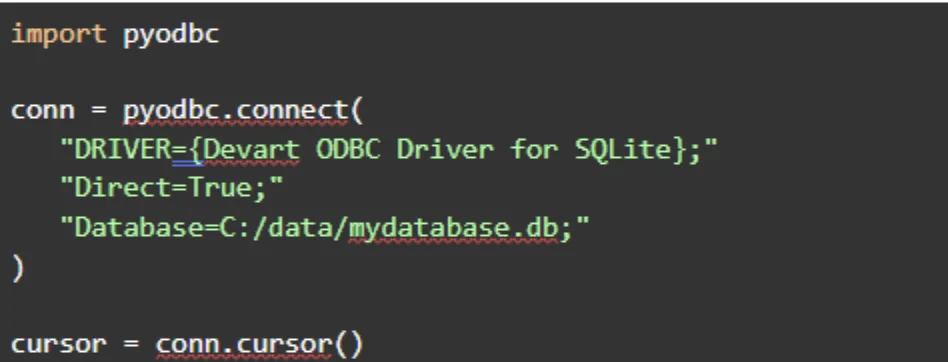
Step 2: Connect to the database in Direct mode
Before applying encryption commands, connect to the database using the Devart ODBC Driver with Direct=True.
Python example
C# example
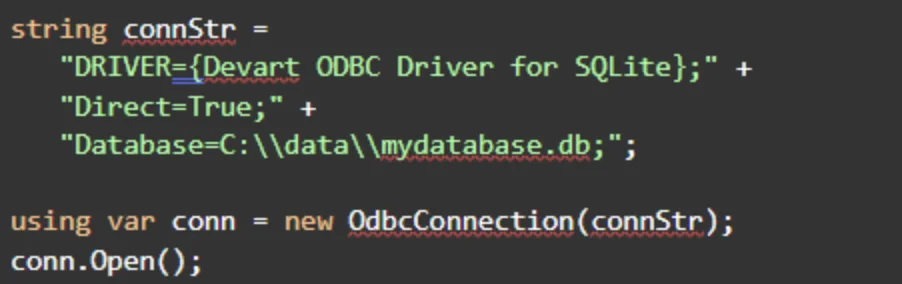
Once connected, encryption commands can be executed through SQL statements.
Step 3: Encrypt the database
To encrypt a database, execute two PRAGMA commands:
- Specify the encryption algorithm
- Apply the encryption key
Example

PRAGMA ENCRYPTION specifies the algorithm used to encrypt an unencrypted database. Available values include:
- TripleDES
- Blowfish
- AES128
- AES192
- AES256
- Cast128
- RC4
The PRAGMA REKEY command performs the actual encryption by applying the specified key to the database.
The PRAGMA ENCRYPTION statement can only be applied to an unencrypted database and cannot be used on a database encrypted with a different algorithm.
Step 4: Connect to an encrypted database
After a database has been encrypted, the encryption algorithm and key must be specified when establishing the connection.
Example connection string
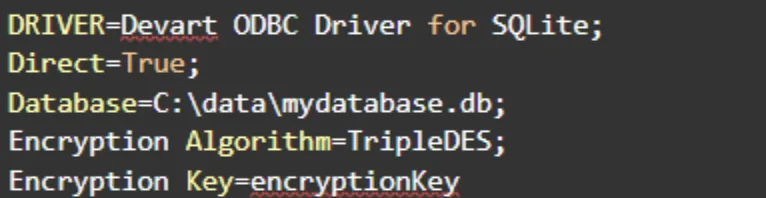
When the correct algorithm and key are provided, the driver decrypts the database automatically during the connection.
Step 5: Change or remove the encryption key
Encryption keys can be updated or removed using the PRAGMA REKEY statement.
Change the encryption key

This command changes the encryption key for the database.
Decrypt the database

Providing an empty value removes encryption and restores the database to plaintext form.
Encryption algorithms and security notes
Encryption protects the database file on disk, but secure key management remains essential for protecting sensitive data. When deploying encrypted SQLite databases, consider the following security practices:
- Store encryption keys outside application code whenever possible.
- Use environment variables or a secrets manager to protect encryption keys.
- Restrict file-system access to database directories.
- Rotate encryption keys periodically as part of your security policy.
Encryption protects the database file on disk, but secure key management remains essential for protecting sensitive data.
Additional security considerations
- Memory encryption: SQLite does not encrypt data held in application memory. Sensitive values remain in plaintext in RAM during query processing. Applications handling highly sensitive fields should clear memory explicitly after use.
- Storage vs. transport: SQLite encryption at rest does not protect data in transit. If the database file is transferred over a network, apply TLS at the transport layer independently.
- Temporary files: Some query operations produce temporary files on disk. Ensure your OS temporary directory is protected or encrypted at the OS level to prevent data recovery from discarded query buffers.
Why choose the Devart ODBC driver for SQLite encryption
For teams that need reliable SQLite encryption without overhauling their build pipeline, the Devart ODBC Driver offers a practical, enterprise-grade path. The core advantage: encryption requires no recompilation, no changes to application logic, and no custom build process to maintain. It becomes a configuration decision, not an engineering project.
Platform & tooling support:
- Windows, macOS, and Linux
- Native ODBC integration — works out of the box with Tableau, Power BI, and any ODBC-compatible framework
- Teams already on ODBC can enable encryption with a single connection string change
Key lifecycle operations supported:
- Initial encryption at database creation
- Key verification
- Key rotation via PRAGMA rekey
- Full key removal
This covers every operation a security-conscious team needs over the lifetime of a production database.
For compliance-critical systems, the support model matters too. Open-source tools usually rely on community forums when something breaks. That can work in many cases, but it’s not always ideal when encryption is tied to regulatory requirements. Devart offers dedicated technical support, which can make a real difference when encryption isn’t just a good practice but something audits and compliance checks actually depend on.
Key advantages at a glance:
- Encryption can be configured directly in the connection string.
- Works natively with ODBC tools, including analytics and enterprise reporting platforms.
- Supports the full encryption lifecycle: creating encrypted databases, reading them, rotating keys with PRAGMA rekey, and removing keys when needed.
- Runs across Windows, macOS, and Linux.
- Supports AES-128 and AES-256 encryption, including protection for WAL and journal files.
- Dedicated technical support available for teams running production or compliance-sensitive systems.
Conclusion
SQLite is everywhere. That’s exactly why encryption often gets overlooked. When a database is just a file sitting on disk, anyone who gets access to that file can open it. Backups, copied files, analytics caches, all become potential exposure points if the database isn’t encrypted. Encryption closes that gap before it becomes a breach.
The Devart ODBC Driver makes this much easier than most teams expect. There’s no need to recompile SQLite or change your application code. You don’t have to rebuild your pipeline either. You only supply the key at connection time, and the driver handles the rest.
If you’re creating a new database, encrypt it from the start. It’s just simpler that way. For databases that already exist, PRAGMA rekey can encrypt them in place. Either way, moving from an unprotected SQLite file to a properly secured database usually takes far less effort than teams assume.
Download the Devart ODBC Driver for SQLite and review the documentation on the product page to get started.