
In today’s digital world, our documents, photos, and work are stored almost entirely on electronic devices. Yet, few people know what to do when disaster strikes — when a file disappears, a drive stops responding, or a system suddenly crashes.
This is where data recovery comes in. Understanding how to recover lost information is not just a technical ability — it’s an essential digital skill for anyone who uses a computer.
What Is Data Recovery?
Data recovery refers to the process of retrieving information that has been lost, deleted, corrupted, or made inaccessible on a storage device.
The causes of data loss can include:
- Accidental deletion or formatting
- System crashes or software failures
- Hard drive damage or corruption
- Power outages or hardware faults
While prevention is always best — for example, by backing up regularly — knowing how to recover data can save hours of work and preserve irreplaceable memories.
The Evolution of Data Recovery Tools
For many years, software such as Data Rescue has been trusted by professionals and home users alike. Developed by Prosoft Engineering, it offered reliable recovery for both Windows and macOS systems.
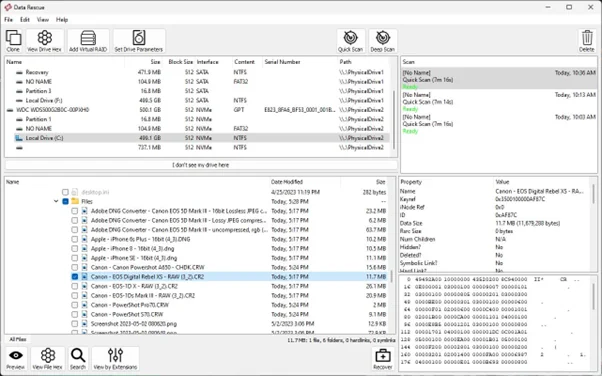
Its main strengths included:
- Quick and deep scanning modes for flexible recovery
- Advanced tools such as disk cloning and search filtering
- Cross-platform compatibility
However, tools like Data Rescue were originally built with IT professionals in mind. As digital literacy spreads, there is growing demand for software that combines professional-grade performance with everyday usability.
A Simpler, More Intuitive Alternative: Magic Data Recovery
Magic Data Recovery represents the next generation of recovery tools. It’s designed to be accessible to anyone, regardless of technical experience.
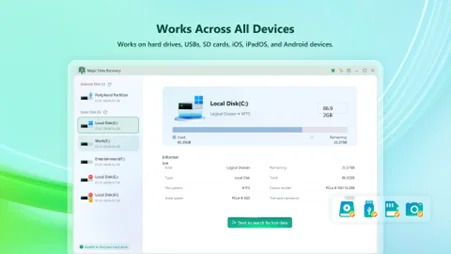
Key Features:
- Supports over 5,000 file formats (documents, photos, videos, archives, and more)
- Works with HDDs, SSDs, USB drives, SD cards, and digital cameras
- Offers Quick and Deep Scan modes for various recovery needs
- Provides a step-by-step interface that’s easy to follow
- Includes a free version for previewing recoverable files
The software focuses on usability: instead of complicated menus, users simply select the drive, scan, preview, and restore.
How Data Recovery Works in Practice
- Download and Install – Get Magic Data Recovery from the official website.
- Select a Drive – Choose the storage device or partition where data was lost.
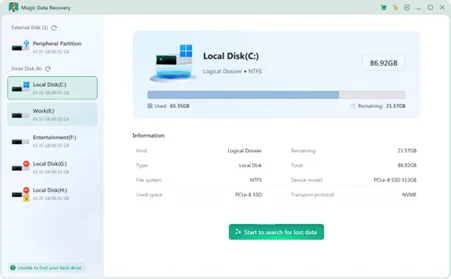
- Scan for Files – The tool analyses the drive using quick or deep scanning.
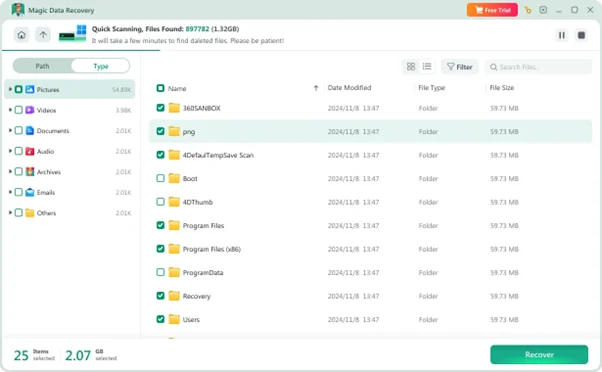
- Preview and Restore – Review the results and safely save recovered files to a new location.

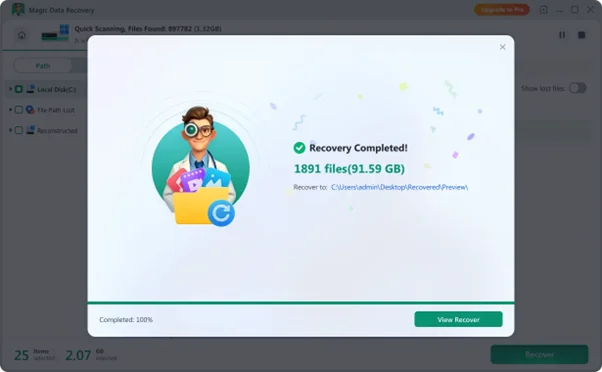
This simple four-step process illustrates the core principles behind most modern recovery tools.
Everyday Scenarios Where Recovery Matters
- Accidental deletion: Files permanently removed with Shift + Delete or emptied from the Recycle Bin.
- After formatting: Recovering data from accidentally formatted drives or memory cards.
- Damaged partitions: Accessing unreadable or corrupted disks.
- System crashes: Retrieving files lost during sudden shutdowns or OS failures.
- External devices: Working with USB drives, SD cards, and external HDDs/SSDs.
Understanding these scenarios helps users act quickly and increase the likelihood of successful recovery.
Why Data Recovery Skills Matter
Knowing how to protect and restore your digital information is a valuable life skill. It can benefit:
- Students and educators – recovering essays, research, and coursework.
- Families – restoring treasured photos and videos.
- Professionals and small businesses – retrieving essential work data.
- IT support and technicians – offering efficient recovery solutions to clients.
In short, data recovery knowledge empowers users to handle digital challenges with confidence rather than panic.
Key Takeaways
- Data loss can happen to anyone. Even careful users make mistakes or encounter failures.
- The right tools make recovery possible. Modern solutions like Magic Data Recovery combine powerful technology with ease of use.
- Digital literacy includes data recovery. Understanding the basics of how files are stored and retrieved is part of being competent with technology today.
If you want to explore this further, try the free version of Magic Data Recovery to see how data recovery works in practice — and gain a valuable digital skill for the future.
Frequently Asked Questions (FAQ)
- Can Magic Data Recovery restore files from formatted or damaged drives?
Yes. Magic Data Recovery includes both quick and deep scan modes, allowing recovery from formatted, damaged, or inaccessible drives. It supports HDDs, SSDs, USB drives, SD cards, and more.
- Is Magic Data Recovery free to use?
Yes. The free version allows up to 2 GB of data recovery. Users can test the software and preview recoverable files before upgrading to the full version.
- How long does a data scan take?
The scan time depends on the drive’s capacity and condition. Quick scans may take only a few minutes, while deep scans on larger or damaged drives may take longer. The program displays real-time progress throughout the process.