


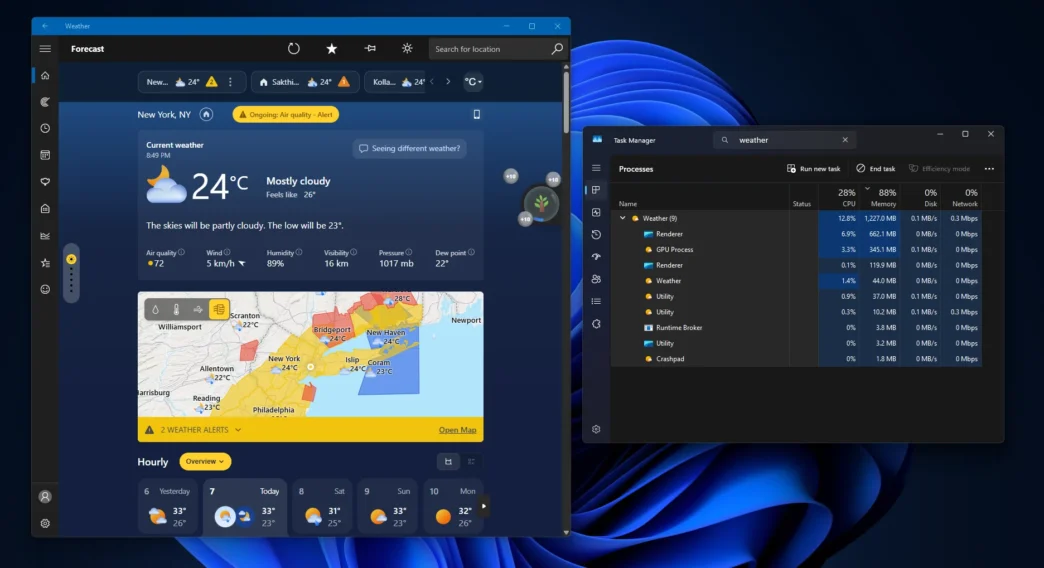
Microsoft’s push to make Windows 11 run smoothly on 8GB PCs just hit an embarrassing snag, and it’s coming from one of the operating system’s smallest, most overlooked apps. According to testing first reported by Windows Latest, the built-in Windows 11 Weather app can consume over 1GB of RAM when opened, with usage settling around 500MB even while idling in the background. For context, that’s nearly 20% of total memory on a machine with just 8GB of RAM — a staggering amount for an app whose only job is to tell you whether to grab an umbrella. The discovery has reignited scrutiny of how Microsoft builds its “native” Windows apps, and it’s landing at an awkward moment for a company that has publicly promised better memory efficiency on entry-level hardware.
Key Takeaways
- The Windows 11 Weather app has been measured using over 1.2GB of RAM at launch, according to Windows Latest testing, compared to roughly 250MB for Apple’s Weather app on macOS — nearly five times less.
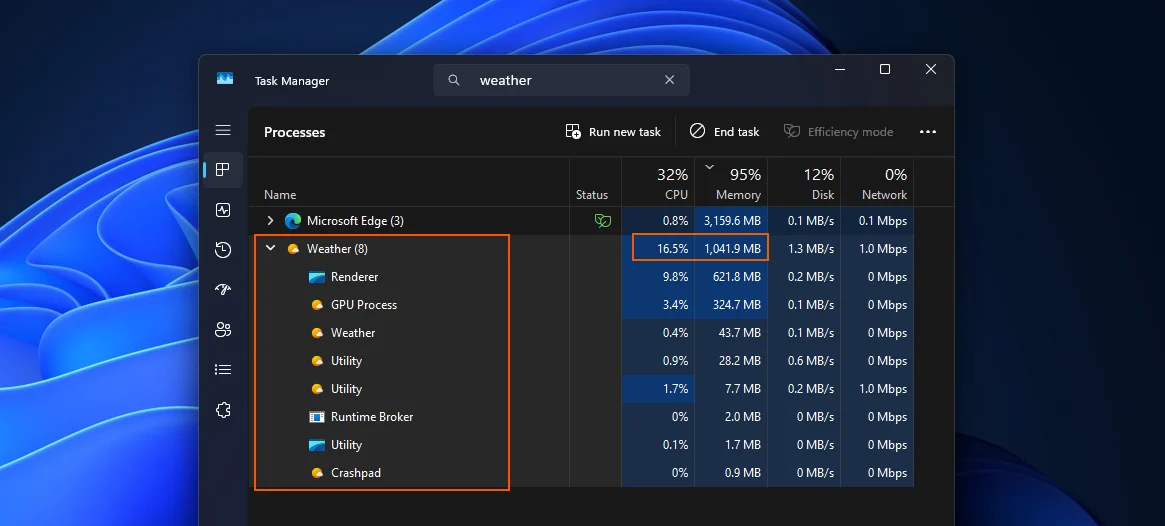
- The bloat comes down to architecture: the Weather app is essentially MSN Weather repackaged inside Microsoft’s WebView2 framework, meaning it renders using the same Chromium engine that powers Microsoft Edge rather than functioning as a lightweight native app.
- Investigators found nine separate Chromium-based sub-processes running simultaneously behind the app, and some of that overhead is tied to the ads MSN Weather displays alongside forecast data.
- Not everyone agrees the numbers tell the full story — some outlets note the original reports don’t disclose the Windows build, app version, WebView2 runtime, or hardware specs used in testing, meaning results could vary by device and session.
The App Everyone Assumed Was Lightweight
For most Windows 11 users, the Weather app is the kind of utility you glance at for five seconds and forget exists — a quick tap from the taskbar or Start menu to check the forecast before heading out. That’s exactly why the recent findings caught so much attention. Windows Latest discovered the issue when one of its writers opened the Weather app during a stretch of heavy rain and noticed Task Manager reporting far more memory usage than a simple forecast widget should ever need. Digging deeper revealed the real story: this isn’t a lightweight, purpose-built Windows tool. It’s a web page wearing a native app’s icon.
Why a Weather App Needs a Browser Engine
The Weather app is not a traditional desktop program — it’s a web app built on Microsoft’s WebView2 framework, essentially a website rendered through browser technology. WebView2 lets Microsoft embed modern web content inside what looks like a native Windows application, which has real advantages for the company: developers can update content independently and reuse existing web technologies without rebuilding a traditional Windows interface from scratch. The tradeoff is that the app inherits a browser’s appetite for resources. Microsoft’s own WebView2 process model includes a browser process, renderer processes that can be split by site isolation, and separate helper processes for tasks like GPU rendering and networking — which is exactly why testers found nine distinct Chromium processes tied to something as simple as a five-day forecast.
That design choice becomes a real problem on budget hardware. On an 8GB system, Wccftech reported the app can consume nearly 20 percent of total system memory, forcing Windows 11 to lean on the SSD as temporary overflow storage — a swap process that causes noticeable slowdowns many users won’t be able to diagnose on their own. It’s a particularly bad look given the issue is unlikely to affect high-end PCs with 32GB or more of RAM, but could have a noticeable impact on entry-level systems with 8GB or 16GB — precisely the machines Microsoft has spent the past year promising to optimize for.
Not Everyone Is Convinced the Numbers Are the Whole Picture
Some skepticism has crept into the coverage. Windows Forum pointed out that neither the original report nor its followups specify the Windows release, Weather app version, WebView2 runtime version, or testing conditions used, and noted that a weather page’s content — animated radar, forecast maps, ad calls, cached imagery — can vary substantially by location and session. In other words, nine Chromium processes alone aren’t necessarily evidence of a runaway app so much as evidence that Weather is using a browser engine to render its content, which is expected WebView2 behavior rather than a bug. Still, as the same outlet concedes, that nuance doesn’t erase the underlying embarrassment: the Windows Weather experience is delivered through Microsoft Edge’s WebView2, giving a simple forecast utility the operating overhead of a browser-based application.
Microsoft’s Fix Is Reportedly Already in Motion
The good news is that this isn’t happening in a vacuum. On July 31, Windows and Devices EVP Pavan Davuluri confirmed that memory optimization for 8GB PCs is now Microsoft’s top engineering priority for the rest of 2026, outlining a system-wide memory allocator overhaul, migration of OS shell components from WebView2 to the native WinUI 3 framework, and efficiency work on the Chromium components that can’t yet be replaced. Reports specifically tied to the Weather app suggest Microsoft is planning low-memory optimizations that could move it away from WebView2 toward a more native implementation by late 2026. Whether that native rebuild actually lands, and whether it also means dropping the ads baked into the MSN-powered experience, remains to be seen — Rudy Huyn, who leads native app development at Microsoft, publicly committed in March to building fully native Windows apps, though whether that extends to MSN-branded apps like Weather remains unclear. Until then, users on constrained hardware have a practical option: disable the Weather widget from running in the background through Windows 11 settings, or uninstall it entirely in favor of a lighter third-party alternative.
Via Windows Latest