
An SPF record lookup helps a domain owner confirm whether their domain name has a valid SPF policy published in DNS. SPF, or Sender Policy Framework, is an email authentication standard that tells receiving mail servers which IP address, mail server, or third-party platform is allowed to send email for a domain.
Without accurate SPF validation, legitimate messages may fail authentication, while malicious senders may attempt email spoofing using your brand identity. Tools such as MxToolBox, EasyDMARC, SuperTool, EasySender, and KnowBe4 can help you run an SPF checker, perform diagnostic tests, and identify SPF validation errors before they affect email delivery.
What an SPF Record Is and Why It Matters for Email Authentication
An SPF record is a TXT record published in your domain’s DNS records. It identifies the authorized senders permitted to send email on behalf of your domain name. These authorized senders may include your corporate mail server, a marketing automation platform, a CRM, an MSP-managed email service, or cloud providers such as Microsoft 365 and Google Workspace.
At a basic level, an SPF record may look like this:
v=spf1 ip4:192.0.2.10 include:_spf.examplemail.com -all
This record tells receiving mail servers that the listed IP address and the included sending service are authorized. If a message comes from an unlisted source, the receiving server can treat it as suspicious.
SPF as an Authentication Protocol
SPF (Sender Policy Framework) is one of several core email authentication mechanisms, alongside DKIM, DMARC, and BIMI. While DKIM verifies message integrity with cryptographic signatures, and DMARC tells receivers how to handle authentication failures, the Sender Policy Framework focuses on whether the sending server is authorized for the domain.
A strong SPF policy helps:
- Improve email deliverability
- Protect domain reputation
- Reduce spam and phishing abuse
- Support anti-phishing and threat protection programs
- Lower the security risk level associated with unauthorized sending
For organizations using platforms such as Delivery Center, Email Health, Reputation Monitoring, or Email Verification tools, SPF validation is often part of a broader compliance check and email health strategy.
Why Authorized Senders Matter
Every email ecosystem has multiple authorized senders: internal mail servers, transactional email systems, help desk platforms, newsletter tools, and sales engagement applications. If these authorized senders are missing from the SPF record, legitimate mail may be rejected or marked as spam.
On the other hand, if the SPF record is too permissive, malicious senders may exploit it. That is why a precise SPF record check is not just a configuration task; it is part of ongoing email security and risk assessment.
How SPF Record Lookup Works: DNS Queries, Mechanisms, and Modifiers
An SPF record lookup works by querying the DNS TXT records for a specific domain name. When a receiving mail server gets an email, it checks the domain used in the envelope sender, performs a DNS lookup, retrieves the SPF policy, and compares the sending IP address against the permitted sources.
An SPF checker or SPF validator automates this process. It can scan domain records, parse mechanisms, identify SPF errors, and show whether SPF validation passes or fails.
SPF Mechanisms Explained
SPF mechanisms define which hosts are allowed to send email. Common mechanisms include:
- ip4: Authorizes an IPv4 IP address or subnet
- ip6: Authorizes an IPv6 address or subnet
- include: Includes another domain’s SPF policy
- a: Authorizes the IP address of the domain’s A record
- mx: Authorizes mail servers listed in the MX Lookup
- exists: Performs a conditional DNS check
- all: Defines the default handling rule
For example:
v=spf1 ip4:198.51.100.25 include:spf.protection.example.com ~all
This record authorizes one IP address and one external sending service.
The Role of Modifiers
SPF modifiers add extra instructions. The most common modifier is redirect, which points SPF evaluation to another domain. Another is exp, which can provide an explanation when SPF validation fails, though it is rarely used in modern configurations.
Soft Fail vs Hard Fail
The ~all mechanism means “soft fail,” while -all means “hard fail.” A soft fail allows receivers to treat unauthorized mail as suspicious, while a hard fail signals that only listed authorized senders should be accepted. Moving from ~all to -all should be done after careful monitoring and diagnostic tests.
How to Check Your Domain’s SPF Record Step by Step
Step 1: Choose an SPF Checker or Diagnostic Tool
Use a trusted diagnostic tool such as MxToolBox SuperTool, EasyDMARC, EasySender, or another SPF raw checker. Many platforms also include related Diagnostics, Blacklists, MX Lookup, Alert Manager, Phishing Link Checker, and report analyzer features.
Review sources such as G2 Crowd, Expert Insights, SourceForge, Channel Program, MSP Pipeline, or vendor Academy content when comparing tools for MSP or enterprise environments.
Step 2: Enter the Domain Name
Enter your domain name into the SPF checker and run the query. The tool will scan the domain DNS records and return the SPF record if one exists. If no SPF record is found, the domain owner should create one using an SPF record generator or manually publish a TXT record through their DNS provider.
Step 3: Review Authorized Senders
Check whether all legitimate platforms are listed as authorized senders. This may include your primary email provider, marketing platform, transactional email provider, CRM, support desk, and security tools.
If an authorized sender is missing, email delivery may suffer. If an old provider remains listed, the SPF record may expose your domain to unnecessary compliance issues or abuse.
Step 4: Confirm SPF Validation Results
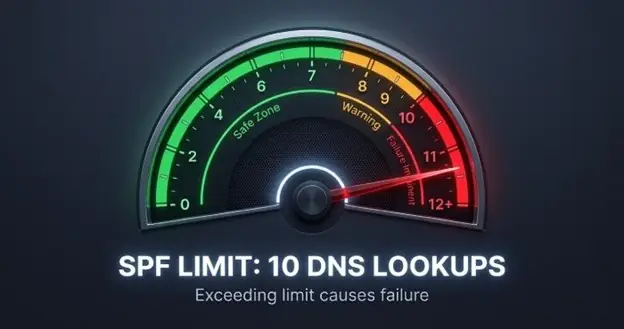
Look for SPF validation status, SPF validation errors, and total DNS lookup count. SPF has a strict limit of 10 DNS lookups. Exceeding that limit causes SPF failure, which can create deliverability issues and weaken email deliverability.
Use an SPF Record Generator Carefully
An SPF record generator can help create or update a policy, especially when you need to add an IP address, subnet, or include mechanism. However, a generated record should still be reviewed through an SPF record lookup, tested with an SPF checker, and aligned with DMARC before production use.
Common SPF Record Errors and How to Fix Them
Even a small syntax mistake can cause SPF validation to fail. Regular SPF record lookup and periodic monitoring help detect problems early.
Multiple SPF Records
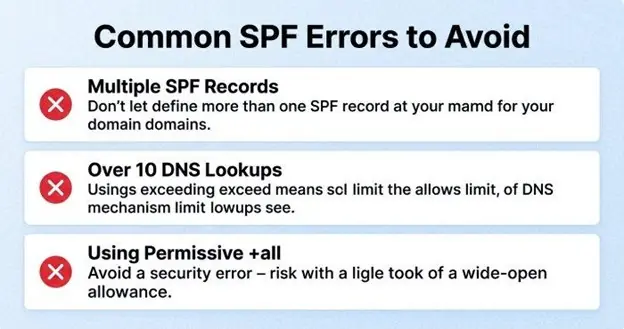
A domain should have only one SPF TXT record. Multiple SPF records cause a permanent error. Fix this by merging all authorized senders into a single policy.
Incorrect:
v=spf1 include:mailprovider.com -all
v=spf1 include:marketingplatform.com -all
Correct:
v=spf1 include:mailprovider.com include:marketingplatform.com -all
Too Many DNS Lookups
SPF permits no more than 10 DNS lookups. Too many include, a, mx, or redirect mechanisms can break SPF validation. Use flattening carefully, remove obsolete vendors, and check each include path with a diagnostic tool.
Missing IP Address or Subnet
If a sending server’s IP address or subnet is not listed, legitimate messages may fail the SPF record check. Add the correct ip4 or ip6 mechanism, then rerun an SPF record lookup to confirm the update.
Overly Permissive SPF Policies
Records using +all effectively authorize everyone and should be avoided. This creates a serious email security gap and may allow malicious senders to impersonate your domain. A safer policy uses ~all during testing and -all once SPF validation is stable.
Best Practices for Validating, Maintaining, and Optimizing SPF Settings
SPF is not a set-it-and-forget-it control. Ongoing monitoring, alerts, and periodic monitoring are necessary because vendors change infrastructure, businesses add platforms, and DNS records drift over time.
Align SPF With DKIM, DMARC, BIMI, TLS-RPT, and MTA-STS
SPF works best as part of a layered email authentication strategy. Combine Sender Policy Framework with DKIM and DMARC to improve domain reputation and reduce spoofing. Add BIMI for brand visibility, and use TLS-RPT plus MTA-STS to strengthen transport security reporting.
Solutions such as EasyDMARC, MxToolBox, Bettertracker, Touchpoint, and similar platforms can centralize monitoring, alerts, compliance check workflows, and report analyzer insights.
Maintain a Clean Sender Inventory
Document every service that sends email for your domain name. Track each sending IP address, subnet, and include mechanism. Remove retired vendors promptly and verify new providers before adding them as authorized senders.
A quarterly SPF record check should include:
- Verifying all authorized senders
- Reviewing lookup count
- Checking for SPF errors
- Testing SPF validation
- Comparing SPF with DMARC reports
- Reviewing email health and deliverability issues
Use an SPF Record Generator During Change Management
An SPF record generator is useful when onboarding new senders or correcting syntax. However, always validate the generated policy with an SPF checker, review the SPF raw checker output, and run diagnostic tests before publishing changes.
For stronger governance, maintain a change log, assign ownership to the domain owner or security team, and integrate SPF validation into broader email deliverability and compliance issues workflows. This helps preserve email deliverability, protect against email spoofing, and keep your Sender Policy Framework configuration accurate as your sending environment evolves.