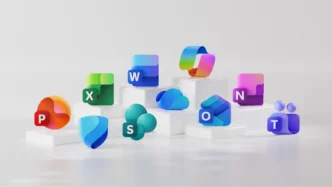

Microsoft has started rolling out a fresh set of redesigned icons for its Microsoft 365 and Office suite—offering a more colorful and fluid look that aims to modernize the experience and reinforce the brand’s connection to its Copilot AI initiative. This marks the first major icon overhaul since 2018 and is designed to be both visually striking and easily recognizable across all platforms.
Key Takeaways
- The new icons feature smoother curves and fluid forms, moving away from sharp edges.
- Microsoft has embraced vibrant color gradients to improve contrast and accessibility.
- The design is influenced by the Copilot AI branding, reflecting a more connected design system.
- Familiar letter identifiers (such as “W” for Word) are retained for brand recognition.
- The update will appear across desktop, web, and mobile versions in the coming weeks.
A New Era for Icon Design
The update to Microsoft 365 icons represents a significant evolution rather than a wholesale rebrand. According to Microsoft’s design leadership, the icons are intended to convey a sense of playfulness and motion with simplified, more approachable forms. Each app, including stalwarts like Word, Excel, PowerPoint, and Outlook, now sports a softened silhouette with folded curves replacing the older, sharper look.

Colorful and Accessible Visuals
A major focus of the redesign is on color palettes. The new icons boast richer and more pronounced gradients, making them brighter and more accessible, especially in smaller sizes. These gradients, more prominent than before, are part of an intentional push for inclusivity—ensuring icons are both visually distinct and easy to find.
Copilot Inspiration Shapes the Change
The redesign draws inspiration from Microsoft’s artificial intelligence branding, particularly its Copilot logo. This unifies the visual language across applications, with every icon echoing the rounded, flowing motifs that now define the brand’s AI-powered features. The update signals Microsoft’s commitment to integrating Copilot and AI seamlessly within its productivity ecosystem.
Maintaining Heritage and Usability
Despite many changes, Microsoft chose to retain the distinctive letter markers—W for Word, X for Excel, and so forth—after considering their strong associative value for users. By keeping these identifiers, the new icons balance familiarity with fresh visual appeal, facilitating an effortless transition while reinforcing user recognition.

Rollout and User Impact
Users can expect to see the redesigned icons on their devices gradually over the coming weeks. The changes will affect all platforms, including Windows, macOS, mobile, and web-based versions of Office apps. The update aligns with Microsoft’s broader evolution toward a unified, AI-driven experience across its suite.
Via Microsoft