


A CO2 laser engraver can help small workshops cut and engrave compatible materials such as wood and acrylic. This guide compares five CO2 laser engravers across three price tiers, covering power, work area, workflow, and running costs.
CO2 vs. Diode: Two Types of Laser Engravers
When it comes to the best laser engravers on the market, you will find CO2 laser engravers and diode laser options. Both technologies can engrave and cut selected materials, but they differ in wavelength, material compatibility, speed, and cost.
A CO2 laser engraving machine works at a different wavelength. These lasers typically operate at 10.6 micrometers and are well suited to many compatible non-metal materials, including clear acrylic and thicker wood. Edge quality depends on the material, settings, focus, and air assist.
Diode lasers are often lower-cost and more compact, but standard blue-diode models generally struggle with clear acrylic and may require more passes for thicker wood. CO2 lasers are often better suited to clear acrylic and thicker compatible wood. The right choice depends on material, thickness, workspace, workflow, and whether bare-metal marking is required.
Before choosing the best laser engraver for your work, consider materials, work area, workflow, budget, and safety requirements.
What Can You Engrave and Cut with a CO2 Laser?
Now that you know the technology options, it’s time to understand what one can actually engrave using the best laser cutter and engraver.
A CO2 laser engraver and cutter can work with a variety of compatible materials, including plywood, solid wood, leather, acrylic, and cardboard. It can also process compatible fabric and rubber, subject to material composition, settings, and safe ventilation.
Compatible CO2 lasers can also engrave glass and stone when the material and setup are appropriate.
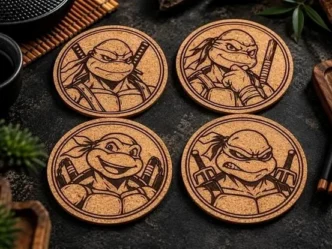
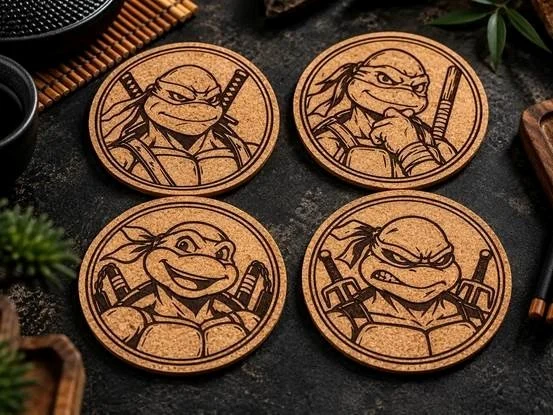
A CO2 laser engraver for wood can support layered art, signs, and coasters, while a CO2 laser for acrylic can make clear signs, keychains, and display pieces. Workable thickness and edge quality vary by material, laser, lens, and settings.
Standard CO2 lasers are not intended to directly cut bare metal. Always check the manufacturer’s material guidance before processing coated, reflective, or unfamiliar materials.
Best CO2 Laser Engravers in 2026
The five picks below are compared by power, work area, workflow, and price.
| Model | Best for | Laser power | Approximate price |
| Bambu Lab R1 | Overall versatility | 55W | $2,499 |
| xTool P3 | Large-format production | 80W | $6,599 sale price / $6,999 MSRP, before tax |
| AtomStack Hurricane | Feature-rich desktop work | 55W | $2,699 before tax |
| OMTech K40+ | Budget-conscious buyers | 45W | $600 |
| Glowforge Pro HD | Guided workflows and long projects | 45W | $7,999 |
Bambu Lab R1: Best CO2 Laser Engraver Overall
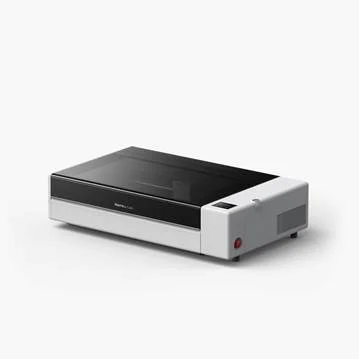
The Bambu Lab R1 is a 55W CO2 laser cutter and engraver with a 600 × 300 mm work area. It suits creators and small businesses that value automated setup.
Its 55W laser and 600 × 300 mm working area support larger projects, while Auto Laser Alignment enables hands-free optical-path calibration.
At $2,499 at the time of writing, the R1 costs more than basic K40-style machines but adds a larger work area and automated setup.
Pros
- 55W CO2 laser
- 600×300mm working space
- Auto Laser Alignment
Cons
- Higher price
xTool P3: Best CO2 Laser Engraver for Large-Format Work
Next up, we suggest using the xTool P3, another CO2 laser engraver that’s perfect for larger projects and batch production. The all-new xTool P3 offers an 80W laser and a 915×458mm working area. That helps it handle large projects.
You even get camera-assisted positioning and a processing speed of up to 1,200 mm/s.
Its optional conveyor can support long-material and batch workflows.
Pros
- 80 W laser
- 915×458mm working area
- Processing speed of up to 1,200 mm/s
- Optional conveyor system
Cons
- Higher price tag
AtomStack Hurricane: Best Feature-Rich CO2 Laser Engraver
The AtomStack Hurricane is a 55W desktop CO2 laser with a 500 × 300 mm work area and a built-in camera. It suits makers and small businesses that want camera positioning, batch workflows, and enclosed safety features, including a Class 1 enclosure, an automatic fire extinguisher, door detection, and an emergency stop.
Pros
- 55W laser
- 500×300 mm working space
- Camera-assisted positioning
- Greater compatibility
Cons
- Higher price tag
- Requires time to learn its software, settings, and safe operation.
OMTech K40+: Best Budget Laser Engraver for Hands-On Users
The OMTech K40+ is a budget option for buyers who are comfortable with more hands-on setup.
Luckily, the OMTech K40+ is not just affordable, but also offers a 45W laser, a 300×200 mm working area, and works well with wood and acrylic. The best part: the essential package costs $599.99. Still, the overall setup is a bit more complicated.
Pros
- 45W laser
- 300x200mm working area
- Budget friendly
Cons
- Requires more setup
- Greater maintenance needs
Glowforge Pro HD: Best for Guided Workflows and Long Projects
The Glowforge Pro HD suits users who prefer a guided software experience.
It offers a browser-based workflow with live camera preview, autofocus, and guided settings for Proofgrade materials, plus a 495 × 279 mm cutting area.
A drawback would be the high price. Unlike other options, this isn’t quite budget-friendly and costs over $7,000. People who want to spend less might not think of it as an ideal option.
The machine requires Wi-Fi and ventilation. Use the included hose near a suitable window or a compatible laser filter, and confirm that its guided workflow fits your material and project needs.
Pros
- 45W laser
- 495 × 279mm cutting area
- Compatible with Proofgrade materials
- Passthrough for extra-long projects
Cons
- Requires a reliable Wi-Fi connection.
CO2 Laser Running Costs: What Most Guides Skip
Knowing about the machine’s features and price tag is crucial, but there are other things to note before buying the best CO2 laser engraver and cutter. For conventional desktop glass-tube CO2 lasers, typical running costs include the following:
- Tube lifespan: Always check your machine’s tube. On average, a tube needs replacement after 1500 to 3000 hours of use, and the replacement costs around $80 to $350. Check the manufacturer’s warranty, service options, and replacement-part policy for the exact model.
- Mirror/lens maintenance: Check how much you will need to spend on mirror/lens maintenance. Typically, these range from 15–50 per set.
- Cooling: The cooling requirements also add to your cost. A basic pump costs $ 30- $ 60, and an external active chiller typically costs around 650–900. Always follow the manufacturer’s recommendation.
- Ventilation: Don’t forget the ducts and inline fan. These cost around 100–250, but if you plan to pick an air purifier, the costs rise to 200–800.
- Power draw: A typical 45–55W desktop CO2 system may draw around 200–600W, depending on the machine and any connected cooling or filtration equipment.
- Noise level: Check the noise level against the limits of your planned workspace.
How to Choose the Best CO2 Laser Engraver
Choosing the best CO2 laser engraver requires you to understand your needs.
- Power: If you have thicker materials, more laser power is needed.
- Working area: An undersized bed may limit project dimensions or require you to split designs across multiple jobs.
- Software option: Always check the software option. Make sure it supports your preferred design tools and file formats.
- Enclosure and safety: Consider whether an enclosed system or an open design fits your workspace, workflow, and required safety measures.
- Accessories: Choose accessories only when they support the materials or workflows you plan to use.
Conclusion
The Bambu Lab R1 balances automated setup and desktop CO2 capability. The xTool P3 fits large-format and production-focused work, while the AtomStack Hurricane offers a feature-rich 55W option. The OMTech K40+ suits hands-on buyers on a tighter budget, and the Glowforge Pro HD is built around guided workflows and extra-long passthrough projects.
Before choosing a laser engraving machine, compare the materials, work area, setup needs, ventilation, and ongoing costs for the models you are considering.