


Final Thoughts
There are quite a few companies that take an already existing product line and add a feature that no one really wants or cares about to rebrand that product link and in-turn charge more for it. Corsair took the HX750 power supply and upped the efficiency certification to 80PLUS Platinum and added Corsair Link functionality to the unit. These two features warrant a price increase and a new power supply line for Corsair.
Voltage regulation is a very important thing when it comes to a power supply. The Corsair HX750i had very good voltage regulation in our tests. While we did see “ripple” in all of the rails it was within the acceptable limits of what we expect from power supplies these days. The voltage regulation on each of the rails are as follows: 3.3V: 2.14%, 5V: 1.58%, 12V: 1.65%. As I mentioned this power supply is 80PLUS Platinum certified that means that it will be 92% efficient at 50% load and 89% efficient at 100% load. During our tests we measured efficiency with the Corsair Link software and it remained at the advertised specifications.
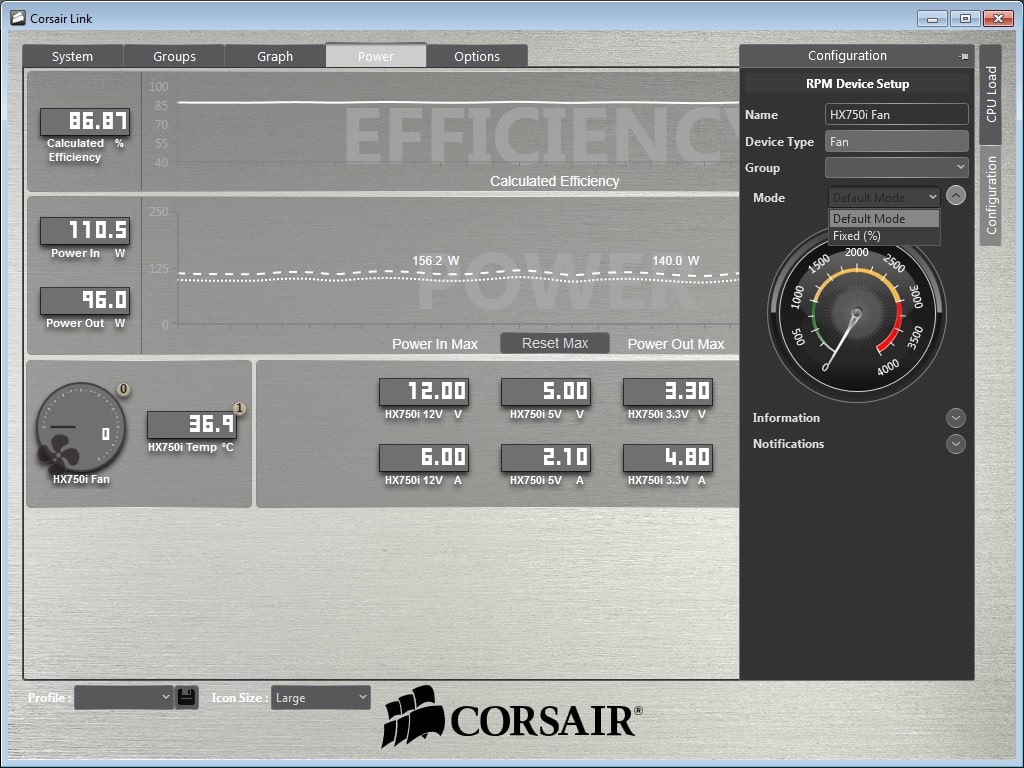
Talking about Corsair Link it is a great piece of software. Once you have connected the supplied Corsair link cable to your motherboard you will be able to monitor efficiency, power in, power out, all of your voltages, and the fan speed of the 140 mm cooling fan. You are also able to turn multi-rail mode on or off and set the fan to fixed mode instead of its default zero RPM mode. The zero RPM mode is actually a great idea. If you power supply is not that warm the fan really does not need to be running. When your power supply starts to heat up the fan kicks in to keep things nice and cool. This no only means your power supply will be quite but this makes it more efficient as well.
When purchasing components for a system one component I tell people never to skimp on is the power supply. Remember this is what is powering all of your components and if something happens to the power supply it could affect or even damage your components. Right now this power supply is selling for $169.99 at my favorite online retailer. With the Platinum certification and Corsair Link support this price is very justified. Also Corsair does stand behind their product giving it a 7 year warranty.
If you are looking for a 80PLUS Platinum certified power supply Corsair’s HXi Series is a great choice. Overall ThinkComputers gives the Corsair HX750i power supply a 10 out of 10 score and our Recommended Award!


Pros:
– 80PLUS Platinum certified
– Zero RPM fan mode
– Corsair Link compatible
– 100% modular
– Good voltage regulation
– 7 year warranty
Cons:
– None that I found



I have an H100i cooler, and I have always had major issues with the Corsair Link software. You say here that it is a great piece of software. What version did you use, and where did you get it?
Dan it worked just fine on my system. The version was 2.7.5339 and I downloaded it from Corsair’s website: http://www.corsair.com/en-us/support/downloads
Thanks. I think the last one I had was 2.5, and that had horrible issues with Win8.1.
I don’t get it (I really don’t); all these company’s are coming out with newer – more efficient and digital to boot – PSU’s, yet still include an ancient floppy drive connector…why?
I get what you are saying, although with the power supply other devices do use that connector like fan controllers and hard drive enclosures.
Well, some people still do use floppy drives, as mysterious as that may be. My dad still uses his LS-120 drive.
As for that Z97-K/CSM, the CSM portion stands for “Corporate Stable Model.” Many corporate workstations still use PCI devices, and their business relies on that PCI device. So, Asus putting out a motherboard that will be around a while (the CSM part) and has PCI slots means those corporations can rely on having the support they need. Back when PCIe first came out, when most mainstream motherboards had one AGP connector and 5 or 6 PCI connectors, and ISA had been gone for more than three years, I knew of a couple corporate systems that still used ISA and EISA cards, and those businesses relied on those systems. A significant portion of their business would be significantly impaired if those systems went down for any reason.
I remember one system in particular that was hooked to a high speed document scanner through an EISA card to a motherboard with a Pentium III Xeon. This system would scan the documents into a system where the customers service department could call them up to confirm a transaction took place, and the circumstances around it. If that system had gone down for any reason, they would have in excess of 10,000 documents per day stacking up that they needed to store. Eventually, they did add a second system for redundancy, but that one system performed on its own for over three years. It wasn’t smart, but it was what they did. These days, they’ve replaced that with databases and computerized interfaces, but back then it had to take place on paper before it could be computerized.
psu manufacturers should provide means to run water pump without power on the motherboard, so its possible to fill the tubes without overheating the cpu. also would be nice to provide powering of fans when motherboard has been switched off, but components are still hot. and you should measure voltage ripple amplitude and voltage spikes when powering on and off the psu hard at the back. i know, it takes an osciloscope to read millisecond x millivolt scale. but at least do tell if the psu is noisy (air outtake) and how cool/warm is it at 80% (or more) power draw.