


The Editing Skill Gap Is Larger Than Anyone Admits
There’s a persistent myth in content creation that video editing is a quick skill to master with tutorials. In reality, professional-quality editing has a steep learning curve, complex software, and takes months—not hours—to reach a competent level.
For most marketers, entrepreneurs, educators and creators, closing this skill gap is unrealistic while juggling their core work responsibilities. This results in either no video content, low-quality outputs, or expensive outsourcing.
AI text-to-video generation eliminates this problem at its root. No editing skills are required—you describe what you want, and the platform produces it. This guide explains exactly how this process works and how to get the best possible results.
Understanding Text-to-Video AI: How It Actually Works
Text to video AI uses large language models and video generation models working in combination. The language model interprets your text description, extracting the key elements — subject, setting, mood, motion, style — and translates them into parameters that guide the video generation model. The video model then constructs visual output frame by frame, producing a coherent, motion-consistent clip from your description.
The quality of this process has advanced dramatically in recent years. Early text-to-video systems produced short, unstable clips with obvious artifacts and inconsistent motion. Current systems — particularly those using state-of-the-art models — produce output that is genuinely cinematic in quality, with smooth motion, coherent composition, and accurate style interpretation.
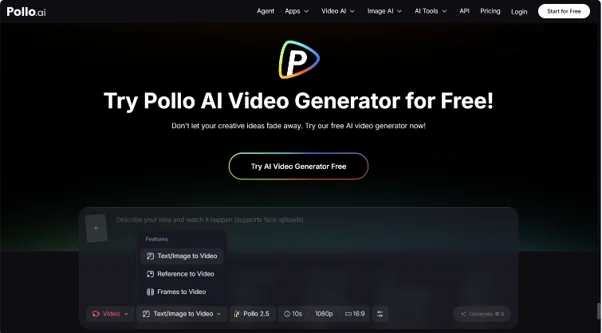
Pollo AI is an AI video generator that aggregates leading image and video models in a single platform, supporting text-to-video, image-to-video, and text-to-image workflows. It brings together over a hundred AI creative applications, enabling users to produce cinematic-quality footage, social media content, and virtual avatars without any professional editing skills. Understanding the technology behind the platform helps you use it more effectively.
What Makes a Great Text to Video Prompt
This is the most important skill in AI video creation, and it is entirely learnable with practice. A great prompt communicates five things clearly.
The subject is what or who the video is about — be specific rather than generic. Instead of “a person,” describe “a woman in her mid-thirties wearing a tailored blazer.” Instead of “a product,” describe the product’s specific visual characteristics.
The setting establishes where the action takes place and what the environment looks like — time of day, weather, architectural style, and any relevant background elements all contribute to the visual coherence of the output.
The mood and lighting define the emotional tone of the clip. Warm, golden-hour lighting communicates something very different from cool, overcast daylight or dramatic, high-contrast studio lighting. Be explicit about what you want.
The camera style describes how the scene is captured — wide establishing shot, close-up, tracking shot, aerial perspective, and so on. Including camera direction gives the model specific visual parameters to work with.
The visual style specifies the overall aesthetic — photorealistic, cinematic, animated, documentary, stylized, and so on. This single element has a large impact on the character of the output.
Step-by-Step: From Text Description to Finished Video
Step 1 — Write Your Prompt Using the Five-Element Framework
Apply the framework above to write a complete, specific prompt before you open the platform. Writing your prompt offline — in a notes app or document — allows you to refine it without the pressure of an open generation window.
Step 2 — Choose Your Generation Mode
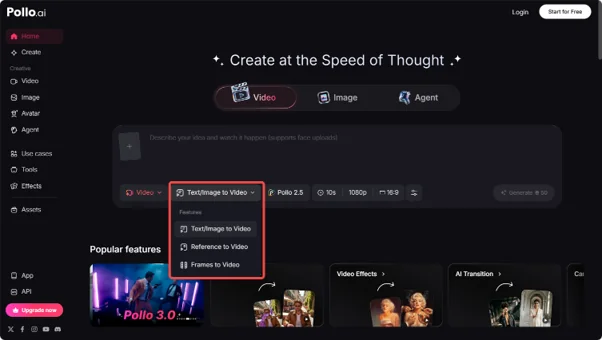
Decide whether you are working from text alone or incorporating a reference image. Text-to-video is the most flexible approach and works well for original content. Image-to-video is useful when you have an existing visual — a product photo, a brand image, or a reference shot — that you want to animate or stylize.
Step 3 — Select Your Model
Pollo AI’s AI video generator provides access to multiple top-tier models, including Pollo 2.5, Sora 2, and Kling. Each has different strengths — review the available options and select the model best suited to your intended visual style. For cinematic realism, choose accordingly. For stylized or animated output, a different model may serve you better.
Step 4 — Generate and Evaluate
Submit your prompt and evaluate the output systematically. Check motion quality — is it smooth and natural? Check compositional accuracy — does the scene match your description? Check style consistency — does the visual aesthetic match your intention? Note specifically what works and what does not before deciding whether to iterate.
Step 5 — Refine and Finalize
If the output needs adjustment, modify the specific elements of your prompt that did not translate accurately and generate again. Experienced users typically run two to four iterations before arriving at a final output. This is not a sign of failure — it is a normal part of the creative process with AI tools.
Text to Video AI: Expanding What Is Creatively Possible
The Text to Video AI capabilities within Pollo AI represent one of the most significant expansions of creative access in recent memory. For users who have never been able to produce video content because of the technical barrier, this technology makes an entirely new category of creative expression available.
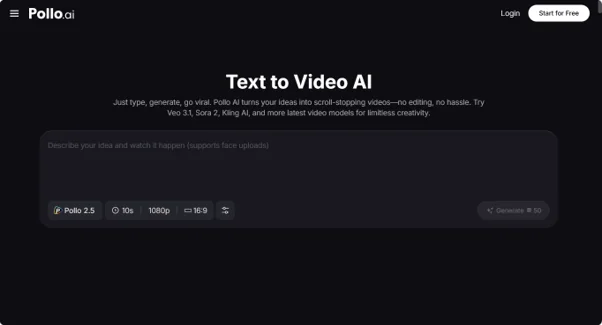
Pollo AI’s Text to Video AI tools aggregate models including Pollo 2.5, Sora 2, and Kling, with automatic cinematic-quality audio matching and a wide range of creative styles. The platform supports professional-grade output across social, commercial, and cinematic formats — making it equally useful for a first-time creator and an experienced marketer looking to scale production.
The breadth of creative styles available through Text to Video AI means you are not limited to a single aesthetic. You can produce photorealistic product videos, stylized brand content, animated educational clips, and cinematic narrative sequences — all from text descriptions, all without editing software.
Advanced Prompt Techniques for Better Results
Use sensory language: Describing how something feels, sounds, or smells — even in a visual medium — often helps AI models produce more evocative and emotionally resonant output. “A warm, humid summer evening” produces different visual output than “a summer evening.”
Reference established visual styles: Terms drawn from photography, cinematography, and art direction — “shallow depth of field,” “chiaroscuro lighting,” “flat lay composition” — give the model precise technical parameters to work with.
Iterate systematically: Change one element of your prompt at a time when iterating, so you can identify which changes produce which effects. Random, wholesale prompt rewrites make it difficult to learn what is actually working.
FAQ
- How long can AI-generated videos be?
Maximum clip length varies by platform and model. Most current AI video tools produce clips ranging from a few seconds to around a minute, with longer outputs becoming more widely available as the technology develops.
- Is output quality good enough for professional use?
Modern AI video generation, particularly from platforms using current top-tier models, produces output that meets professional publishing standards for social media, digital advertising, and online marketing in most cases.
Conclusion: The Skill Gap Is No Longer the Barrier It Was
Text-to-video AI has fundamentally changed who can create professional video content. The editing skill gap that has excluded the majority of marketers, entrepreneurs, educators, and creators from video production is no longer a structural barrier — it is a problem that current technology has already solved.
The five-element prompt framework, the model selection approach, and the systematic iteration process in this guide give you a practical, repeatable method for producing professional video content from text alone. The only remaining step is to apply it.
Write your first prompt. Generate your first clip. Iterate once or twice. Publish. The production barrier you have been working around is gone.