
Microsoft’s recent Windows 11 24H2 update has been marred by a significant bug affecting the Auto HDR feature, leading to game crashes and incorrect color displays. In response, the tech giant has paused the update for affected devices and advised users to disable Auto HDR to avoid further issues.
Key Takeaways
- Microsoft has confirmed a bug in the Auto HDR feature of the Windows 11 24H2 update.
- The bug causes incorrect color displays and crashes in various games.
- Microsoft has blocked the update for devices with Auto HDR enabled until a fix is released.
- Users are advised to disable Auto HDR to maintain system stability.
Overview Of The Auto HDR Bug
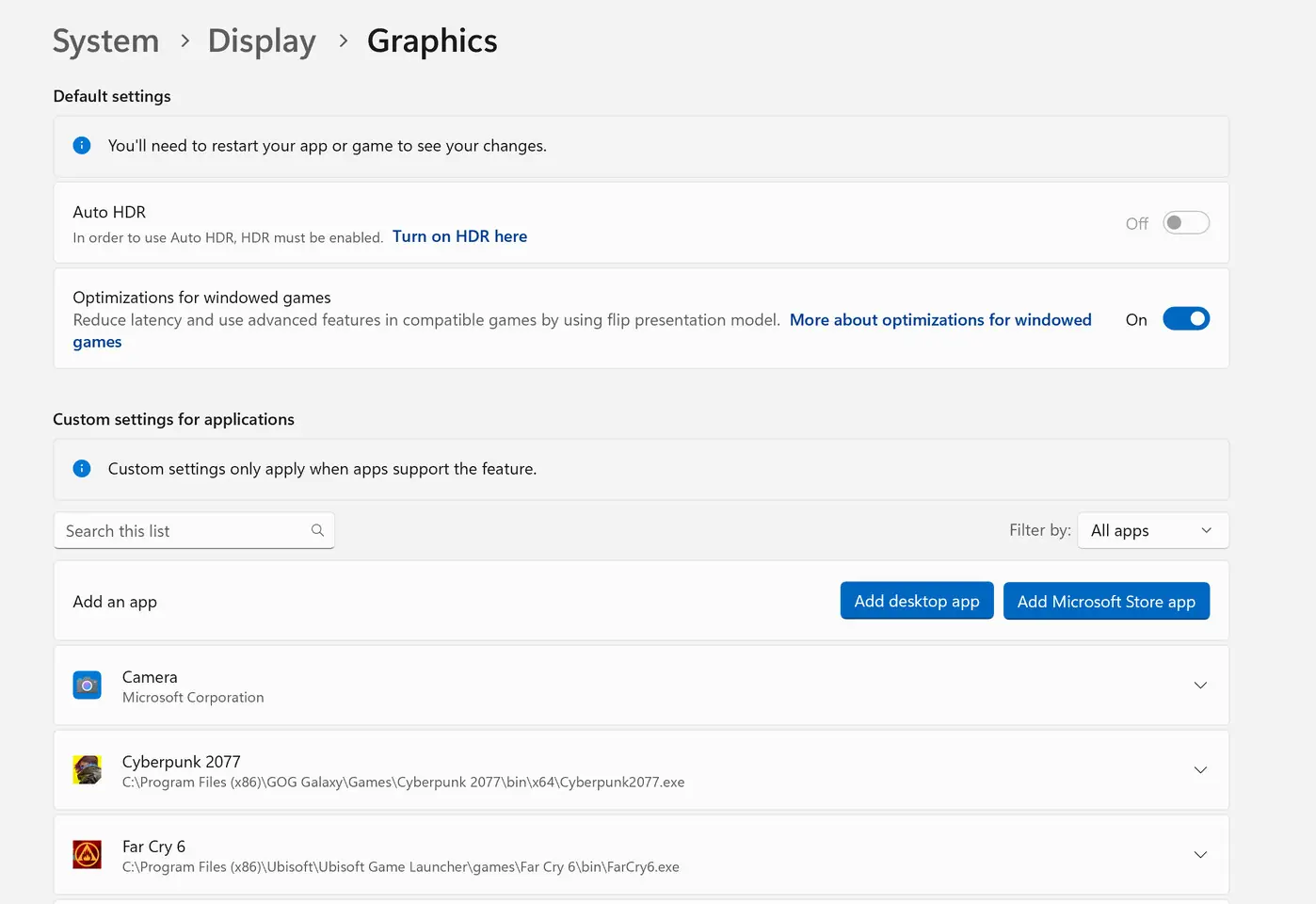
The Auto HDR feature in Windows 11 is designed to enhance gaming visuals by converting standard dynamic range (SDR) content to high dynamic range (HDR). However, the latest update has caused this feature to malfunction, resulting in distorted colors and application crashes. Popular games such as Call of Duty, Assassin’s Creed Valhalla, and Far Cry have been reported to experience these issues, frustrating gamers who rely on the visual enhancements.
Microsoft’s Response
In light of the widespread issues, Microsoft has taken proactive measures:
- Compatibility Hold: The company has implemented a compatibility hold on devices with Auto HDR enabled, preventing the installation of the 24H2 update.
- User Guidance: Microsoft has advised users to turn off Auto HDR to avoid problems. This can be done through the following steps:
- Go to Settings > System > Display.
- Select Graphics and toggle off Auto HDR.
- Manual Update Warning: Users are cautioned against manually installing the update using the Windows 11 Installation Assistant or ISO files while Auto HDR is enabled.
Impact On Gamers
The Auto HDR bug has not only affected the visual quality of games but has also led to significant gameplay disruptions. Users have reported:
- Games freezing or crashing unexpectedly.
- Incorrect color reproduction, making games visually unappealing.
- Affected titles include popular franchises, leading to widespread dissatisfaction among the gaming community.
Future Fixes
Microsoft is currently working on a patch to resolve the Auto HDR issues. While no specific timeline has been provided, the company has acknowledged the severity of the situation and is prioritizing a solution. In the meantime, users are encouraged to disable Auto HDR to maintain a stable gaming experience.
Conclusion
The Windows 11 24H2 update’s Auto HDR bug highlights ongoing challenges within Microsoft’s operating system updates, particularly for gamers. As the company works towards a resolution, users are left navigating the complexities of maintaining their gaming setups without the benefits of Auto HDR. Until a fix is released, disabling the feature remains the best course of action for affected users.