


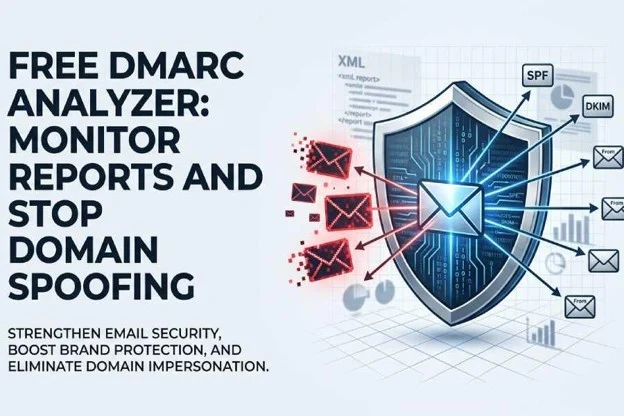
The free DMARC analyzer helps organizations understand who is sending email on behalf of their domain, where authentication is failing, and whether attackers are attempting domain spoofing. For security teams, IT administrators, and compliance leaders, the value is immediate: better email security, stronger brand protection, and clearer visibility into spoofed email activity before it damages trust.
What a DMARC Analyzer Is and Why Your Domain Needs One
The role of DMARC in domain control
A DMARC analyzer is a reporting and monitoring tool that converts raw DMARC reports into readable dashboards, summaries, and action items. DMARC, which stands for Domain-based Message Authentication, Reporting, and Conformance, works with SPF and DKIM to verify whether email claiming to come from your domain is legitimate. Without a dmarc analyzer, these XML reports are difficult to interpret at scale.
For any organization using email for customer communication, invoicing, support, recruiting, or marketing, domain spoofing is a serious risk. Attackers can send a spoofed email that appears to come from your brand, creating opportunities for phishing attacks, fraud prevention failures, business email compromise, and brand impersonation. A dmarc analyzer gives security teams real-time insights into these attempts and helps improve email deliverability by ensuring legitimate senders are properly authenticated.
Why monitoring starts before enforcement
Effective dmarc management begins with visibility. Jumping directly to dmarc enforcement without understanding your mail ecosystem can block valid senders such as CRM platforms, marketing automation systems, help desks, or payroll tools. A free dmarc analyzer lets you identify authorized cloud service providers, detect unknown sources, and confirm whether your dmarc record setup is aligned with SPF and DKIM.
This is where brand protection and reputation protection overlap. If attackers use direct domain spoofing to send a spoofed email, recipients may blame your company. Strong dmarc management helps preserve trust, protect email deliverability, and reduce email impersonation risks across the business.
How DMARC Reports Reveal Spoofing, Phishing, and Email Authentication Issues
Reading DMARC reports effectively
DMARC reports show which IP addresses and services are sending mail using your domain, whether those messages pass SPF or DKIM, and whether they align with DMARC policy. A good dmarc analyzer transforms these dmarc reports into real-time insights, using filters, charts, and in-app summaries so teams can quickly distinguish legitimate traffic from suspicious activity.
For example, a dmarc analyzer may reveal that a trusted cloud service is passing SPF but failing DKIM alignment, causing email deliverability issues. It may also show a sudden spike in spoofed email from unfamiliar infrastructure, indicating email impersonation or domain spoofing. These insights and analytics are central to modern cybersecurity and risk management.
SPF, DKIM, and alignment signals
Email authentication depends on more than simply publishing records. SPF checks whether the sending server is authorized. DKIM confirms that the message has not been altered and was signed by an approved domain. DMARC evaluates alignment, meaning the visible “From” domain matches the authenticated domain.
When authentication fails, a dmarc analyzer can show whether the issue is technical misconfiguration, unauthorized email, or active attack protection concern. These real-time insights support data protection, regulatory compliance, and compliance and governance initiatives by documenting how the organization manages domain control.
Separating misconfiguration from active threats
Not every failure is malicious. Some failed messages come from legitimate vendors that were never configured correctly. Others may be clear signs of domain spoofing, phishing attacks, or email impersonation. A user-friendly console helps analysts review sending sources, apply filters, and use a recommendation engine to decide whether to authorize, investigate, or block.
This level of reporting and monitoring is especially important for companies with multiple business units, regions, and cloud service applications. A dmarc analyzer supports brand protection by helping teams detect spoofed email quickly while maintaining email deliverability for valid campaigns and transactional messages.
Key Features to Look for in a Free DMARC Analyzer
Usability, analytics, and guided action
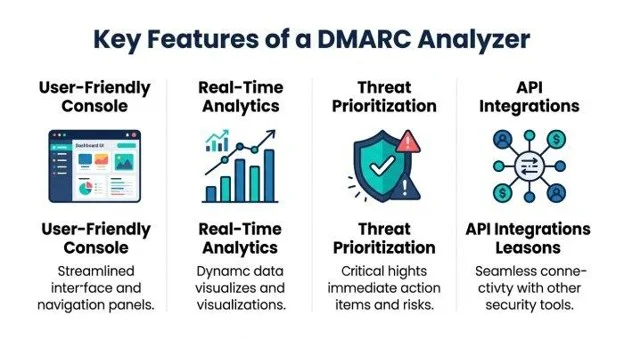
A free dmarc analyzer should not require deep XML expertise. Look for self-service tools that provide a user-friendly console, clear sender classification, real-time insights, and practical support and guidance. The best tools make dmarc management approachable for IT teams while still giving security teams enough detail for advanced email security investigations.
Important features include automated source discovery, domain grouping, in-app summaries, alerting, and insights and analytics that explain why messages pass or fail. A strong dmarc analyzer should also help prioritize risks, identify spoofed email campaigns, and recommend steps toward dmarc enforcement without harming email deliverability.
Console design, filters, and summaries
A well-designed console should make it easy to view domains, sending sources, authentication status, and policy outcomes. Filters should allow teams to isolate failures by source, geography, volume, or authentication result. A user-friendly console reduces the burden on administrators and accelerates dmarc management decisions.
For brand protection, speed matters. When a spoofed email campaign begins, real-time insights can help security teams respond faster, improve threat protection, and reduce exposure to customer-targeted email impersonation.
Integrations and operational fit
Modern email security rarely exists in isolation. A dmarc analyzer should fit into a broader security architecture through api integration, security integrations, and cloud service workflows. For larger organizations, managed services may also be valuable when internal teams lack time or expertise.
Mimecast, for example, offers capabilities and resources that align with broader email and collaboration security needs. Organizations may evaluate DMARC Analyzer alongside the Mimecast Platform Overview, Email & Collaboration Threat Protection, Collaboration Threat Protection, Managed Threat Response, Email Archive, Insider Risk Management, Data Governance, and Compliance & Insights. Related solutions and programs such as Incydr, Aware Governance & Compliance Suite, Engage Security Awareness, Security Behavior Management, Agentic AI Security, and the API Platform can support wider human risk management, insider threats monitoring, and security behavior management.
API platform, partners, and service models
Enterprises often rely on Reseller Partners, Managed Service Providers, Technology Alliance Partners, and the Mimecast Partner Services Program to operationalize dmarc management. Partner Success and Customer Success teams can help translate findings into action, while Partners may deliver managed services for ongoing reporting and monitoring.
Useful research and enablement resources include the Resource Library, Cyber Insights Blog, Mimecast Knowledge Hub, Threat Intelligence Hub, and Cybersecurity Glossary. Customer stories, Awards, ESG & Global Impact updates, and SpringLaunch announcements can also help teams understand product direction, ai-powered solutions, and emerging threat intelligence.
Step-by-Step: Setting Up DMARC Monitoring and Interpreting Results
A practical setup workflow
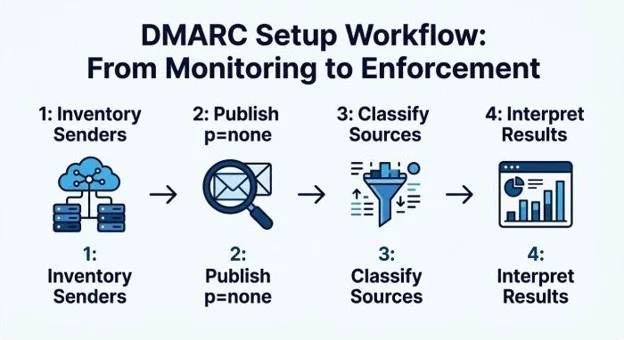
Start by inventorying every cloud service and internal system that sends mail using your domain. This may include Microsoft 365, Google Workspace, marketing platforms, finance systems, ticketing tools, and customer communication applications. Accurate domain control is the foundation of dmarc management.
Next, publish a DMARC record with a monitoring policy, typically p=none, and direct aggregate reports to your dmarc analyzer. This allows the analyzer to collect dmarc reports without blocking messages. After several days or weeks, review the user-friendly console to identify known senders, unknown senders, SPF failures, DKIM failures, and sources associated with spoofed email.
Then, classify each sender. Authorized sources should be configured correctly with SPF, DKIM, and alignment. Unknown or suspicious sources should be investigated for domain spoofing, brand impersonation, or email impersonation. A free dmarc analyzer with real-time insights can make this process faster by showing authentication patterns and alerting teams to high-risk activity.
Interpreting results without disrupting mail
When interpreting results, focus first on high-volume legitimate senders that fail authentication. These are the sources most likely to affect email deliverability if enforcement is applied too early. Work with vendors to fix SPF includes, DKIM keys, and alignment. Use the dmarc analyzer to confirm improvements.
Next, investigate low-volume failures and suspicious geographies. These may indicate spoofed email, direct domain spoofing, or attempted business email compromise. Strong dmarc management requires repeated validation because email ecosystems change as teams adopt new cloud service tools.