A racing game can look impressive and still feel wrong if the setup is not right. Forza Horizon 6 is the kind of game where small technical choices can affect the whole driving experience. Frame rate, input response, storage, controls, and graphics balance all matter when players are moving at high speed through city roads, mountain routes, and open-world events.
But setup is not only about the PC. Once the game feels smooth, players still need a progression plan. Cars, credits, upgrades, and account progress decide how much freedom players have after the first few races.
A better experience comes from tuning both sides: the system running the game and the progress inside the game.
Smooth Racing Starts Before The First Event
Many PC players start by pushing every setting as high as possible. That is understandable, but it is not always the best choice for a racing game.
In fast driving, stability matters more than screenshots. A beautiful scene is less useful if the frame rate drops during a corner or if input delay makes the car feel heavy.
A practical PC setup should focus on:
- Stable frame rate
- Clean visual clarity
- Responsive controls
- Balanced reflections and shadows
- Enough storage space
- Fewer background apps during play
The goal is simple: make the car feel predictable. When the car responds properly, players can focus on racing instead of fighting the setup.
PC Features Give Players More Control
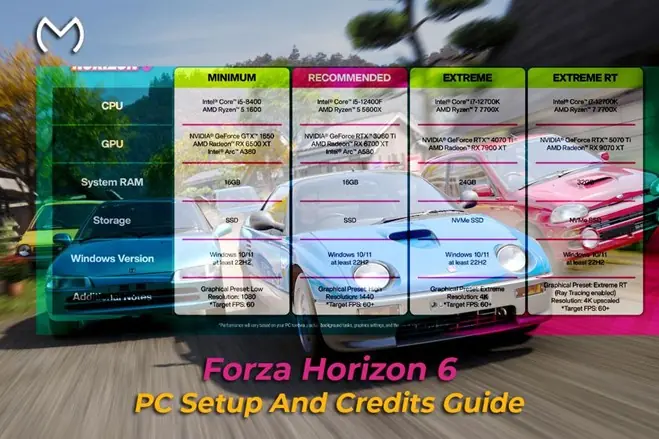
The official breakdown of the PC version of Forza Horizon 6 highlights features such as ray tracing, upscaling, ultrawide support, multi-monitor support, graphics presets, benchmarking, mouse navigation, and PC-focused interface options.
That matters because no two PC players have the same setup. One player may have a high-end system and want the best visuals. Another may want higher frame rates and lower input delay. Someone else may be using an ultrawide monitor or a racing wheel.
The best PC settings are not always the highest settings. They are the settings that match the player’s hardware and driving style.
Storage And Drivers Still Matter
Performance problems are not always caused by graphics settings. Storage, drivers, and background software can also affect how smooth the game feels.
For an open-world racing game, players should treat system maintenance as part of the setup. A clean install, updated drivers, and enough free storage can reduce avoidable issues.
Before long sessions, PC players should check:
- Graphics driver updates
- SSD space
- Windows background apps
- Controller or wheel connection
- Display refresh rate
- Benchmark results
These small checks can save frustration later. They also make the game feel more consistent during races and events.
Controls Can Change The Whole Experience
Controls are easy to overlook, but they shape how every car feels. A controller, keyboard, or racing wheel can all work, but each one needs proper adjustment.
Players should test steering sensitivity, throttle control, braking response, camera preference, and wheel feedback before spending too much time on serious races or upgrades.
A good control setup helps players:
- Corner more consistently
- Avoid unnecessary mistakes
- Get better value from upgraded cars
- Enjoy drifting and technical routes
- Complete events with less frustration
Better control does not only make racing easier. It makes progression smoother because fewer mistakes usually mean better results.
Progression Needs Its Own Setup
Once the PC side feels right, players still need to think about progression. A smooth frame rate does not help much if the garage is weak, useful cars are missing, or credits run low.
Credits are part of that setup. They help players buy cars, upgrade performance, test builds, and prepare for different event types.
Players who want more flexibility with purchases, upgrades, and garage planning often look for better ways to manage Forza Horizon 6 credits as part of their wider progression plan.
Smart credit use can help with:
- Buying missing car types
- Upgrading useful vehicles
- Testing builds
- Preparing for events
- Improving garage variety
- Reducing slow progression
A stable PC makes the game feel better. A stable progression plan keeps the game moving.
Account Progress Should Not Feel Like A Bottleneck
Some players get the technical setup right but still feel slowed down by account progress. They may want to keep their own profile, but they do not want to repeat slow tasks just to reach the cars, upgrades, or garage level they care about.
For players who want to keep their own profile but reduce repetitive tasks, personal account progression support can help keep progress moving without starting over.
This fits players who want to:
- Keep their own account
- Improve garage progress
- Reduce repetitive grinding
- Focus on preferred cars
- Reach useful upgrades faster
- Spend more time actually racing
The idea is not to replace the game. It is to remove some of the friction that slows down the parts players enjoy most.
A Useful Support Option For Players
Some PC players enjoy doing everything manually. Others prefer a smoother path when progress starts feeling repetitive. Both approaches can make sense depending on how the player wants to enjoy the game.
Players who want extra help with credits, account progress, and digital game-related goals can also look at MitchCactus as a gaming-service option that fits progression-focused play.
Support is most useful when it stays in the background. The player still chooses the cars, settings, routes, and goals. Extra support simply helps make the path less repetitive.
Final Thoughts
Forza Horizon 6 on PC is not only about higher graphics settings. The best experience comes from stable performance, comfortable controls, clean storage, smart settings, and a progression plan that keeps the garage useful.
Players who tune both the system and the progression path will usually have a smoother experience. The PC should make the car feel better. The plan should make the game feel easier to enjoy.