Introduction
I recognize the problem of small business owners in building a brand that really stands out. Designer hiring can be pricey. Even simple design applications such as Canva require learning and practice.
This is the reason why AI design tools have been a gamechanger for users. They can come up with logos, visuals, and entire brand identities within minutes.
Zawa is one of those brand tools. It is an AI branding agent that can make a business identity in no time. Here in this article, I’ll explain my experience trying Zawa, its features, and the best users, like small businesses, indie creators, and client-serving designers.
What Is Zawa?
Zawa is an inventive AI branding assistant that targets small businesses and creators. It was previously known as x-design and is now available on Android via the Play Store.
The main idea of tool is “From Zero to Wow”. This means you don’t need any design skills. You just share your ideas, and Zawa creates a full brand identity for you in minutes.
There are two main users:
– Designers can use it to accelerate client work and substitute many other tools.
– Business owners to make a whole brand independently without getting a design team.
Getting Started (Onboarding & First Impressions)
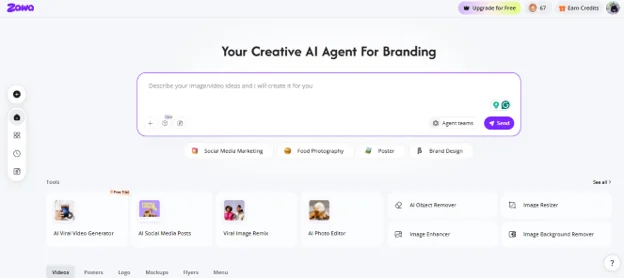
Zawa was super easy to use for me. Signing up, logging in, and seeing the main dashboard felt like a smooth motion with no fuss. There was no setup or installation needed, so I could start using it right away.
The initial exposure was so simple and easy for a novice. Rather than making each design myself, I only gave the essential info such as the name of the business and the idea. Zawa, after that, made all the brand items for me in the blink of an eye.
Usually, I use something like Canva, so this is a whole new experience. Instead of starting at a blank canvas, I just gave an idea, and then Zawa took care of the whole designing part without me.
Core Feature Breakdown
Logo & Brand Identity Generation
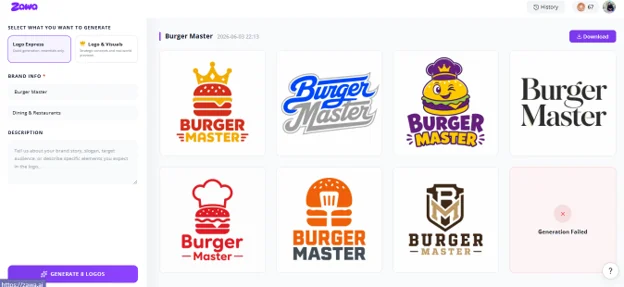
Zawa helps you create logos online and complete brand identities powered by AI. When I tried Zawa, creating a logo was very simple. I just entered my brand name, industry, and style. Within seconds, it gave me logo ideas based on modern trends, colors, and layouts.
It also showed different styles like minimalist, abstract, and 3D, which helped me explore more options quickly. After that, I could easily edit everything like colors, fonts, layout, size, and resolution to match my choice.
Zawa also gave multiple logo variations along with full brand kits and mockups. I could download the final logos in formats like JPG, PNG, and SVG, usually without watermarks. Overall, it felt like a fast and simple way to build a full brand identity in one place.
Brand Application — Stores, Products & Online
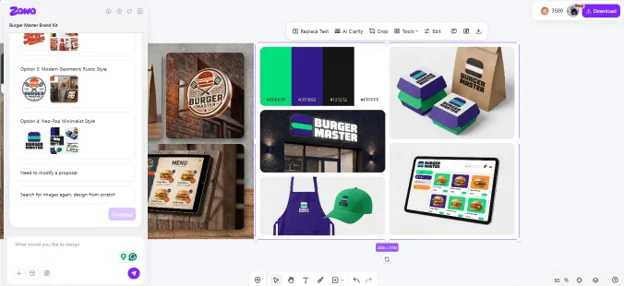
While testing Zawa with different content besides logos, I found that it can extend the brand very well to both real-world and online usage.
For example, I uploaded a picture of a store, and it instantly generated a branded mockup according to the style I chose. Besides that, it also designed packaging, business cards, labels, and turned out other product-related materials.
For online, it produces website images and social media kits. In general, brand consistency is quite strong across all different media.
Marketing Materials & Social Media Content
With Zawa, I was able to design posters, menus, and other promotional materials effortlessly. I could start my work either from a blank canvas or a reference image, and all the elements remained editable and in layers, allowing me to tweak the details at any time.
Product & Food Photography Enhancement
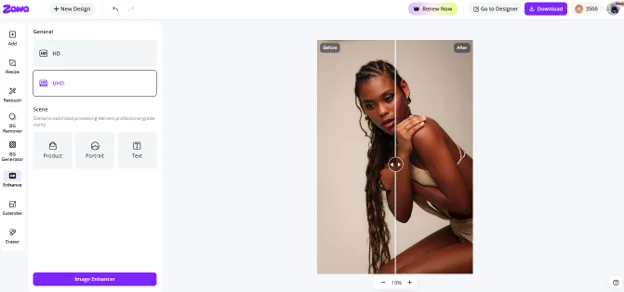
Zawa Image Enhancer converts simple photos of products or food into clean, professional, and ready-for-platform visuals.
By using Zawa’s image enhancer, I found it very effective in enhancing simple products and food pictures. I put the basic pictures in, and it instantly transformed them into sharper, clearer, and more polished looking images suitable for social media or e-commerce. Besides that, it also allows batch upload which enabled me to enhance several images simultaneously.
Real-World Use Cases & Performance
- New store opening: Starting from a very simple idea, you can instantly generate a whole brand identity, including logo, colors, fonts, and supporting visuals.
- Product launch: Design menus, price lists, posters, and promotion materials production-ready for marketing in a snap.
- Seasonal campaign: Automatically generate holiday and event-oriented campaigns to have the promotions planned in advance.
- Brand upgrade: Update the image of your business without having to go through the whole design process again.
Performance & Output Quality
- Speed: Most of the time, assets are created within a couple of seconds to a few minutes, which means it is great for fast workflows.
- Consistency: Branding tends to stay quite stable across different outputs, variations being minor and dependent on prompts.
- Editing capacity: Since outputs are layered, it is very easy to make changes to text, colors, layouts, and design elements.
- Platform experience: The Android app is designed to enable quick creation, whereas the web version provides deeper control and more tools.
Who Is Zawa Best Suited For?
- Restaurants, cafes, and food businesses: Creating menus, posters, and other branded materials quickly and easily
- Boutique shops, salons, flower shops, and local vendors: Easily create professional-looking branding without the need for a designer
- First-time entrepreneurs: An affordable means to develop an entire brand identity from scratch
- Busy small business owners: Efficiently and effectively make changes to daily promotions, offers, and social content
- Freelance designers / agencies: May be used as an assisting tool to accelerate client’s branding work
- Least suitable for: Large businesses or users requiring very custom, artistically complex, or specialized design systems
Pricing
- Free ($0/month): Basic credits, limited image/video generation, access to core AI tools
- Plus ($5.83/month): More credits, higher limits, background removal, upscaling, e-commerce tools
- Pro ($20.83/month): High usage limits, advanced models, stronger image + video generation
- Max ($41.67/month): Highest credits, heavy video use, full model access
Conclusion
Zawa is a very efficient AI branding software. It can create a complete brand identity within minutes. It offers many design services all in one place such as logos, brand kits, posters, menus, product images, and social media content.
Moreover, it might not be able to completely replace expensive custom design work, but it should be a perfect solution for regular branding and marketing purposes. Besides that, Zawa can create, manage, and grow a consistent brand presence with minimum effort.