


Testing – System Testing
As we start our testing we will be running a few different benchmarks. Benchmarks on this page are primarily focused on CPU and overall system performance. For gaming benchmarks be sure to check out the next page.
First up we have PCMark 8. We concentrate on the Home, Work, and Creative benchmarks. Each benchmark is run on the “conventional” setting.

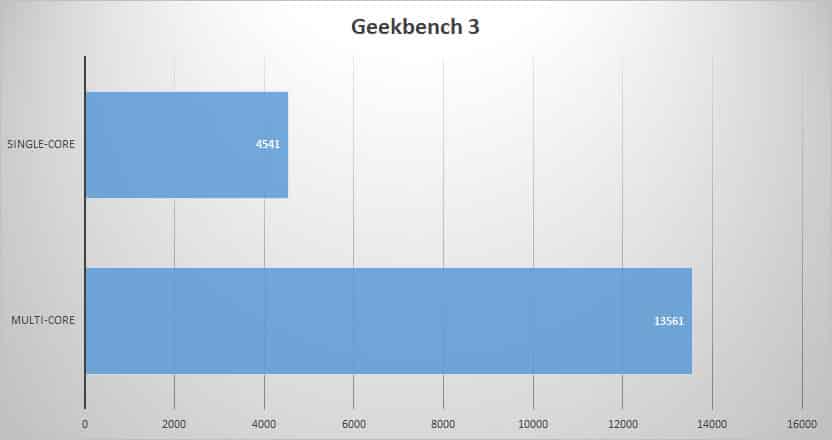
Next we have Geekbench 3. Geekbench 3 is Primate Labs’ cross-platform processor benchmark, with a new scoring system that separates single-core and multi-core performance, and new workloads that simulate real-world scenarios.
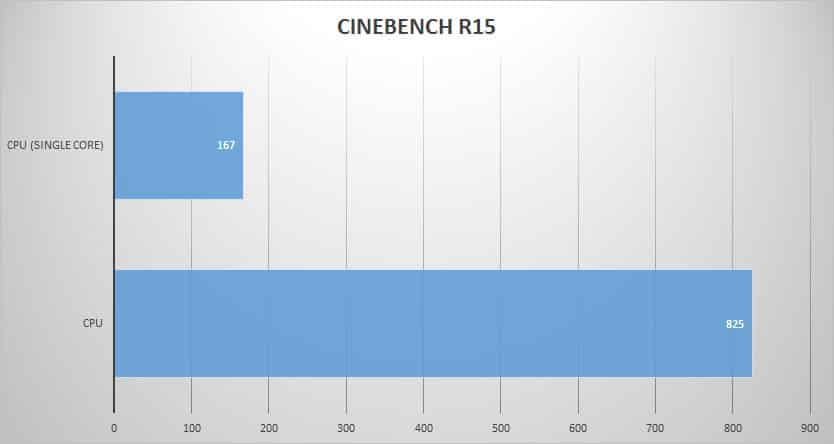
CINEBENCH uses a test scenario that makes use of all of your system’s processing power to render a photorealistic 3D scene (from the viral “No Keyframes” animation by AixSponza). This scene makes use of various algorithms to stress all available processor cores. Higher scores are better here.
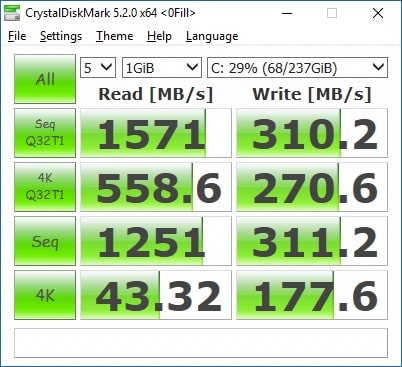
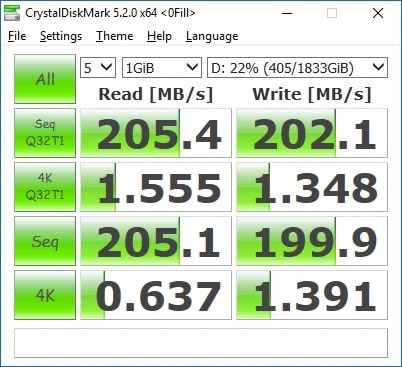
Finally we used CrystalDiskMark to test the speeds of the two hard drives. Below on the left we have the results from the 256 GB PCIe solid state drive and on the right the results from the 2TB traditional hard drive.


Since you could build this yourself for under $1600, this feels at least $500 too expensive. You can build a similarly spec’ed Alienware for $500 cheaper than this.