


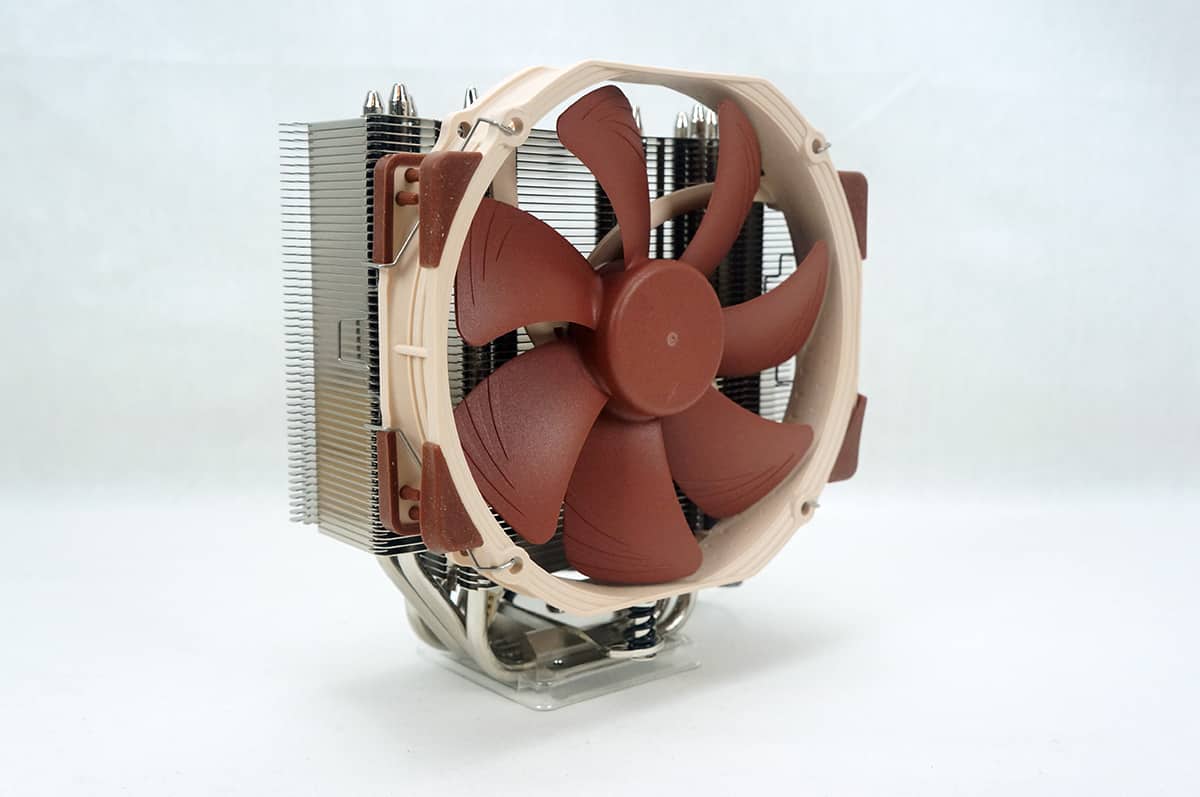
Noctua NH-U14S Overview
Taking a closer look at the NH-U14S we can see that it has the same U-series style design as many other of Noctua’s coolers. With the fan attached the cooler has official dimensions of 165 mm x 150 mm x 78 mm (HxWxD). This means you will have more than enough room to fit this cooler is your system.


The included fan on the NH-U14S is Noctua’s own NF-A15 PWM fan. Noctua has designed this fan to be a low noise fan and its round frame complies with Noctua’s AAO (Advanced Acoustic Optimisation) standard. The fan has 120mm mounting holes, but has been enlarged to 150mm width in order to provide superior performance on today’s high-end CPU coolers. This fan by itself costs around $25.99! Looking at a side view of the cooler we can see just how thin it is. The heatsink stack is only 52 mm thin, when the fan is added that brings the total thickness of the cooler to 78 mm.


The heatsink stack is made up of aluminum fins. Taking a look from the back of the cooler you can see the heatpipes come up from the CPU block and extend all the way out to the top of the cooler. On the top fin of the cooler there is a Noctua logo.


There are a total of six heatpipes that come directly into the CPU block and out the other side. These heatpipes are made of nickel-plated copper and are 6mm in diameter. Taking a closer look at the base of the block it is completely smooth, great machining work here. It is also made of nickel-plated copper.




Great cooler….oh wait….it won’t mount in an East/West direction on AMD processors..that eliminates an entire segment of the PC users…..lame…so nothing to see here…move along…
Not sure what you mean by East/West, but it mounts on AMD the same way as Intel, with the fans blowing out the back of the case.
this is on the Noctua website under FAQs…
“Can the cooler be installed turned by 90° on AMD sockets?
No.
The new SecuFirm2™ mounting system for AM2, AM2+ and AM3 uses the same
standardised hole spacing as the Intel system and thus allows for a much
easier installation, but the cooler cannot be installed turned by 90°.”
Reaaaaly wanted one of these for Christmas and was disappointed, so I got a Phanteks ph-tc14pe…
Paul, I think the AMD mounting does install the cooler with the East/West direction (with the cooler fan inline with the rear case fan). I agree the FAQ is kind of confusing and I think Noctua may have even put the wrong photo in to illustrate the AMD SecuFirm2 mounting. Anyway looking at the install directions and an AMD install video on Youtube by Ali Karar, I believe skinnypupp is correct.
I actually had a rep from Noctua USA Emailed me a while back and said no….bummer..obviously he was wrong…..it looks and performs sweet…sigh…went ahead and got a Phanteks ph-tc14pe…as there is only a few degrees difference depending on the web site, so I will see how it works…sorry for coming off like a butt….
Way too much thermal paste, only a rice grain-sized amount!