


System Overview & Testing
For testing we will be using our X79 system.
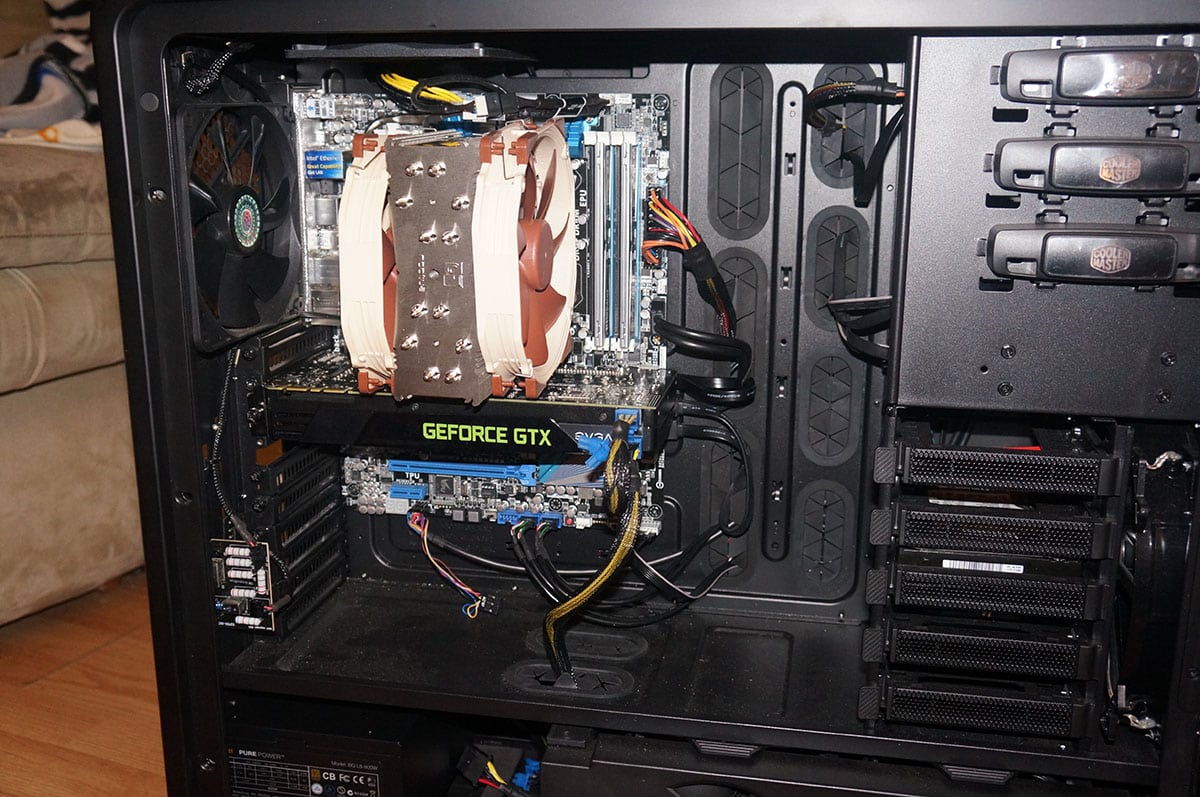
It is made up of the following components.
Processor: Intel Core i7-4960X Extreme Edition
Motherboard: ASUS P9X79 Pro
Video Card: NVIDIA GeForce GTX 680
Memory: 16GB Kingston 10th Anniversary
Power: Thermaltake Smart 750W
Storage: 750GB SATA II Drive
Cooling: Noctua NH-U12S
Case: Cooler Master Cosmos II with 5 fans
For testing we will be using the Intel Burn Test with the AVX instruction set. We use this instead of Prime 95 as it will push the processor much harder. We have it set on the maximum setting and let it ruin through 3 passes. This gives us a realistic idea of the temperatures the processor would hit when it is under full load.
Keep in mind this is an Extreme Edition processor. These run much hotter than normal chips so keep that in mind. Since making our change to the Core i7-4960X Extreme Edition we have only tested a handful of air coolers on it so we do not have that much of a comparison. First up is our idle temperatures.
Now for our load test.

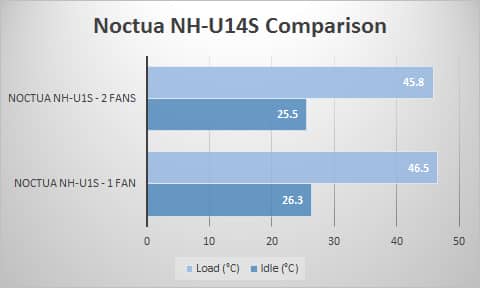
As you can see this is the best performing air cooler that we have tested on our new X79 setup!
Noctua did provide us with a second NF-A15 PWM fan so we also tested with two fans installed. Those results are below.


Great cooler….oh wait….it won’t mount in an East/West direction on AMD processors..that eliminates an entire segment of the PC users…..lame…so nothing to see here…move along…
Not sure what you mean by East/West, but it mounts on AMD the same way as Intel, with the fans blowing out the back of the case.
this is on the Noctua website under FAQs…
“Can the cooler be installed turned by 90° on AMD sockets?
No.
The new SecuFirm2™ mounting system for AM2, AM2+ and AM3 uses the same
standardised hole spacing as the Intel system and thus allows for a much
easier installation, but the cooler cannot be installed turned by 90°.”
Reaaaaly wanted one of these for Christmas and was disappointed, so I got a Phanteks ph-tc14pe…
Paul, I think the AMD mounting does install the cooler with the East/West direction (with the cooler fan inline with the rear case fan). I agree the FAQ is kind of confusing and I think Noctua may have even put the wrong photo in to illustrate the AMD SecuFirm2 mounting. Anyway looking at the install directions and an AMD install video on Youtube by Ali Karar, I believe skinnypupp is correct.
I actually had a rep from Noctua USA Emailed me a while back and said no….bummer..obviously he was wrong…..it looks and performs sweet…sigh…went ahead and got a Phanteks ph-tc14pe…as there is only a few degrees difference depending on the web site, so I will see how it works…sorry for coming off like a butt….
Way too much thermal paste, only a rice grain-sized amount!