


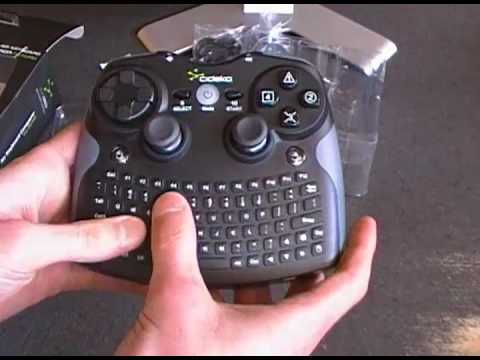
Cideko originally created the Air Keyboard and Mouse for HTPC users. Now they’ve decided to step up their game, expand the size and include a PlayStation 3 style controller on top. The result is an amazing all-in-one solution that will leave all user bases satisfied, albeit, some more than others. Check out the full review to find out why Cideko has dubbed their latest all-in-one product the Conqueror.
Specifications & Features
Frequency Range: 2.4 – 2.483GHz
Battery: Lithium-ion Rechargeable (User replaceable)
Operation Time: Greater than 20 hours of constant use
Charging Time: 3 – 4 hours
Range: Up to 10 meters (~ 32 feet)
Dimensions (L X W x H): 149 x 126 x 47mm
Supported Operating Systems: Windows 98/ME/2000/XP/Vista/7, PlayStation 3
4 Programmable buttons
Packaging
The box is all black with a large window on the front that shows off the Conqueror. On the flip side, the back has a few pictures, specifications, and a simple setup diagram.


Opening up the box we’ll find the Conqueror, wireless dongle, USB charge cable, a lithium-ion rechargeable battery, and a CD with the user manual and key mapping software.

For a complete overview of what’s in the box, check out our unboxing.
Were the tests done using 32 or 64-bit?
Just bought the device and I’m on Win7 Ultimate x64. I confirmed that the version numbers and device model numbers in your screenshots are the same as mine. However, the AVKapp does not allow me to set anything – all options are greyed out. The Cideko website is not helpful at all – only entertains sales queries and the driver/software downloads are outdated. I did try them out though and got the same results.
I tested everything in Win7 Pro x64. It’s been a while since I’ve used the Conqueror, but I don’t remember having to do any tricks to get AVKapp to work.
I still have the Conqueror. When I get some time, I’ll hook it back up, re-install the software and see if there are any quirks to setting keys.
Thank you for looking into this… I was able to “solve” the issue by turning off all the bluetooth devices attached to the laptop I was using the Cideko on – BT mouse, keyboard, keypad.
Once the BT devices were turned off, the AVKapp software was able to correctly detect the Cideko device and all the customization options are now available and working.
It is unfortunate that the Cideko Air Conqueror does not play nice with Bluetooth devices.
i have used this for about a year now… major downside for htpc is that the keyboard doesnt illuminate… really hard to type in the dark after a movie or show ends, or at night.. i turn off the gyro and just use the mouse simulation with the right and left stick. sometimes when typing too fast, keys dont register. if my controlleror computer goes to sleep i have to go back in the av map program and click start again… this only happens every once and a while…. also when the remote goes to sleep, when i wake it the gyro is automatically on… i have to turn it off, and again when the keyboard isnt illuminated in the dark its hard to see… it would be nice to start the controller program and run it automatically everytime i turn on my pc… another downside is that there isnt a programmable map key application for mac… my mini would make a better htpc but the remote ties everything together with interfacing, and therfore is a big deal for me…
if all of the above were added, this would kill the market.
This would conquer everything if it didn’t cut out randomly all the time. I can’t play any games with this thing at all. Horrible signal quality. Why couldn’t they have made it bluetooth? Can any genius out there hack this circuitboard and make it use a bluetooth signal for me? It’s a paperweight because of this horrible flaw.